Widget - Facilities Booking Check In
The Facilities Booking Check-In Widget represents Evolution's sophisticated attendance tracking and booking management system, providing organizations with streamlined, dashboard-integrated check-in capabilities that transform facility usage monitoring from complex administrative processes into intuitive, user-friendly interfaces that support real-time attendance verification and comprehensive facility utilization tracking across all organizational spaces and events.
The Widget system integrates seamlessly with Evolution's comprehensive facilities booking platform, automatically presenting relevant bookings for check-in processing based on current time, location, and user permissions, ensuring that facility usage can be efficiently tracked and verified without requiring navigation away from primary workspace dashboards. This intelligent presentation approach reduces administrative overhead while maintaining accurate attendance records.
Advanced check-in processing capabilities enable users to quickly verify attendance, update booking status, and capture utilization data through streamlined widget interfaces that support rapid processing of multiple bookings while maintaining comprehensive audit trails and attendance documentation. This efficient processing approach ensures that facility usage data remains current and accurate for reporting and analysis purposes.
Integration with Evolution's broader facility management and reporting systems ensures that widget-based check-in activities automatically update utilization reports, billing calculations, and space optimization analytics, providing organizations with comprehensive facility usage intelligence that supports both operational efficiency and strategic facility planning across all managed spaces and booking categories.
Settings > Widgets & Home Pages > Widgets > Widget - Facilities Booking Check In
The link will open the Widgets grid. It is a grid view which can be searched, sorted and customised as normal.
To add a new Widget click New  , to edit an existing Widget click Edit
  . A pop up window will appear which will allow the creation or amendment of a Widget.
Select the Widget template : Facilities Booking Check In. Complete the fields and click Save  . Click Configure Widget
  .
.
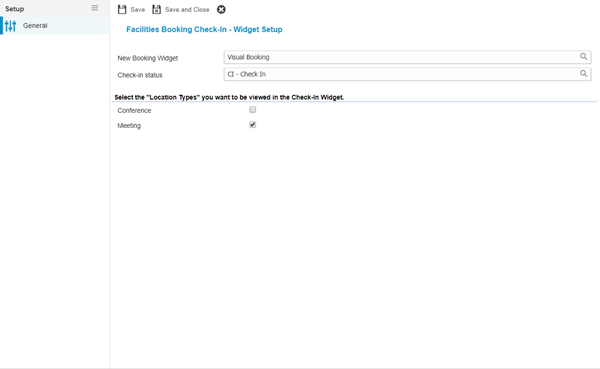
 Click to view - Facilities Booking Check In Fields and Descriptions
Complete the fields and click Save and Close  .
.