Helpdesk - Documents
Available from 5.7.0.0
Helpdesk Documents provides centralized access to all documents related to a task and its associated entities, enabling users to view, assign, and manage documentation without leaving the task context. Use the "Show Documents assigned to" filter to control which entity documents appear in the grid—select Task (always selected, shows task-specific documents), Building (displays documents assigned to the task's building), Location (shows location-related documents), Contract (displays contract documentation), Asset (shows asset-specific files), Reporter (displays documents from the person reporting the issue), Instruction Set (shows procedure documentation), Time Records, Appointment Visits, Events, Surveys, or Mobile Audits. For example, when troubleshooting an HVAC system issue, select Task + Asset + Contract to see the task work order, asset maintenance history PDFs, and contract SLA documents in one unified view. Add new documents directly to the task from this screen using standard document upload controls, while documents for related entities must be added through their respective entity screens to maintain proper data relationships. This supports efficient information access (view all relevant documents in task context without navigation), compliance documentation (access contracts, certifications, and audit trails during task execution), and knowledge sharing (review instruction sets, asset manuals, and historical documentation while planning work). Organizations typically configure which entity types can store documents via Table Register settings, enabling document management aligned with organizational information governance policies and storage requirements.
Task Management > Helpdesk > Helpdesk - Documents
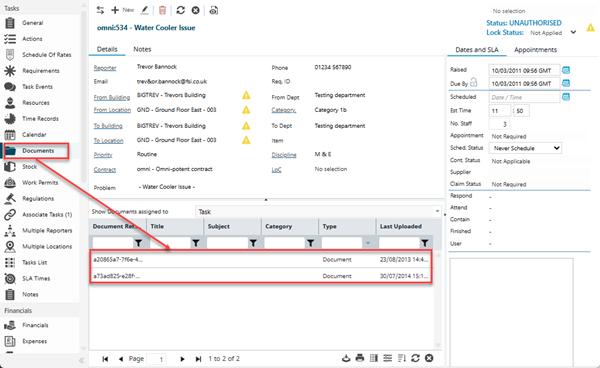
The link will open the Helpdesk / Documents Grid. It is a grid view which can be searched, sorted and customised as normal.
Above the grid this page includes a drop down box allowing selection of MRI Evolution Entities, related to the Task Entity. The drop down list acts a filter for the grid below.
The drop down contains a hard-coded list of Entities but any Entities that have not been set to Store Documents in the Table Register will be excluded from the drop down.
The following entities are supported:
- Task
- Building
- Location
- Contract
- Instruction Set
- Asset
- Reporter
- Time Records - Available from 6.2.0.0
- Appointment Visits - Available from 6.2.0.0
- Events - Available from 6.2.0.0
- Surveys - Available from 6.2.0.0
- Mobile Audits - Available from 6.2.0.0
'Task' will always be selected and will be greyed out so it cannot be unselected. User selections in the filter are persisted against the account profile and will be pre-selected upon return to the page.
If additional Entities are selected in the drop down filter, the selection criteria for the Concept Documents shown in the grid will be expanded to include Documents assigned to the relevant Entity related to the current Task as well as the current Task.
| Field Name | Description |
|---|---|
| Show Documents assigned to |
Drop-down pick list of Task related entities:
|