Helpdesk - Requirements
Available from 5.3.0.0
Requirements (Resource Skills) define the skills or qualifications needed to complete a Task. In the Helpdesk, view and assign Requirements using the sub navigation to ensure each Task is matched with the right resources.
Managing Requirements here supports workforce planning, compliance, and ensures only qualified personnel are assigned to critical activities.
Task Management > Helpdesk
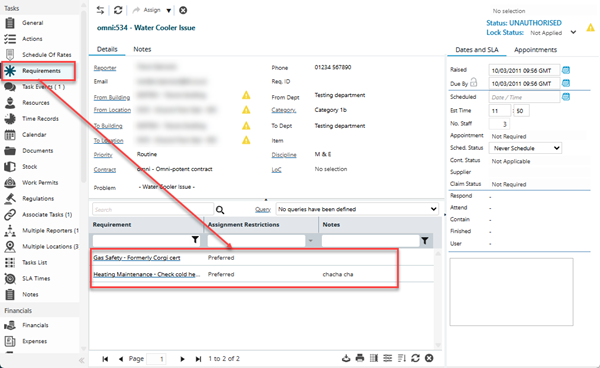
The link will open the Helpdesk / Requirements grid. It is a grid view which can be searched, sorted and customised as normal.
To assign Requirements click Assign  , Resource Skills in the right hand assignment window are assigned to the Task.
To create Resource Skills see Skills
Helpdesk - Requirements Icons
 Click to view more detail.
|
Icon |
Feature | Description |
|---|---|---|
|
|
Assign Skills |
Click the Icon to open an assignment window displaying Skills records to be assigned |

|
Refresh | Click to refresh the grid |
|
|
Assign button group |
|

|
|
Click to open the Time Record page in order to select a Resource to add to the Task. The 'Assign Resource' button is subject to the following constraints:
|

|
|
Click to view the relevant Rota window for the current Task - Task can be assigned within this window. |

|
|
Click to open a map window displaying the available Resources relative to the current Task. ( Evolution Go module required) |

|
|
In order for the Send to Contractor button to function, the current Task must meet the following criteria:
The button will only be displayed if the TeamWorks Contractor Integration licence is present |

|
|
In order for the Remove from Contractor button to function, the current Task must meet the following criteria:
The button will only be displayed if the TeamWorks Contractor Integration licence is present |