Advanced Room Selector
The Advanced Room Selector in MRI Evolution enables users to create and manage recurring room bookings efficiently, supporting meetings and events that repeat over weeks or months. This tool streamlines the process of scheduling multiple Facilities Bookings, saving time and reducing errors. Users can specify Facilities Booking patterns, dates, and requirements to ensure rooms are reserved as needed. To use the Advanced Room Selector, open the tool and follow the prompts to set up your recurring Facilities Bookings according to your organization's needs.
 Available from 7.0.0.0
This function will now open in the same window as MRI Evolution, instead of a separate window, by default.
Users will still have the option to open the function in a separate window.
Either the Close  button will be hidden and the Open in new window
  button will be displayed or vice versa, depending on whether the page is opened in a page of its own, or not.
Modules > Facilities Booking > Advanced Room Selector
The link will open a pop up window which will allow the creation of a Facilities Booking with multiple regular Facilities Booking lines.
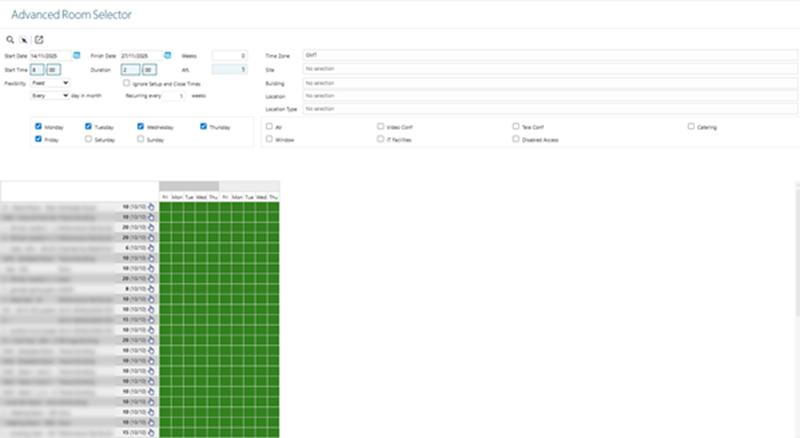
 Click to view - Advanced Room Selector Filters and Descriptions
Complete the filters and click Search Rooms  . The planner will then build a list of bookable rooms.
- Rooms can be selected for Facilities Booking by clicking on them, selected rooms will turn yellow.
- A whole row of rooms can be selected by clicking
 on the corresponding row.
 - Rooms with the background colour of green are available.
- Rooms with the background colour of grey are not available.
- Rooms with the background colour of orange are available according to the flexibility requirements, hovering over the room will show a pop up window detailing when the room is available.
Select the required rooms and click Select item and close form . A pop up window will appear which will allow the creation of the Facilities Booking Header with the selected rooms as Facilities Bookings lines in a Reserved status.