Inventory Management
The Inventory Management grid shows all Inventory that have been ordered. This allows a clear view of all Inventory requirements past and present.
Inventory items can be amended. The status of the item can also be changed.
Modules > Inventory > Inventory Management
The link will open the Inventory Management grid. It is a grid view which can be searched, sorted and customised as normal.
If the Inventory Item has been added from a Facilities Booking it will be viewable from the grid.
To edit an existing Inventory Item click Edit  . A pop up window will appear which will allow the amendment of a Inventory Item.
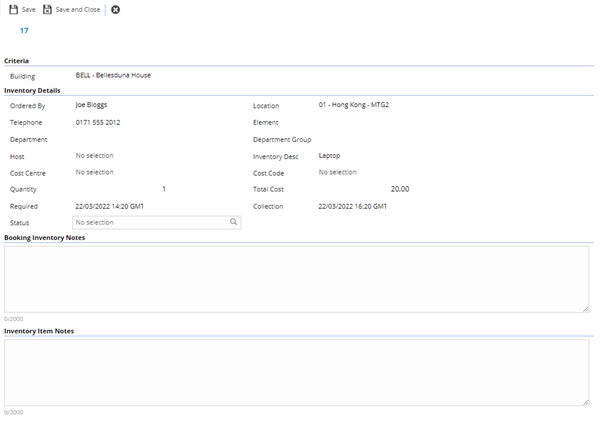
| Field Name |
Description |
| Building |
Auto-populated with the Building for the Inventory Item.
 Available from 7.0.0.0 Available from 7.0.0.0 It is possible to display the relevant parent/child relationship data in this auto-complete by enabling the Enable Hierarchical Auto-Completes option in the General Preferences page. |
| Ordered by |
Auto-populated with the Contact who ordered the Inventory Item. |
| Location |
Auto-populated with the Location for the Inventory Item.
Available from 7.0.0.0 It is possible to display the relevant parent/child relationship data in this auto-complete by enabling the Enable Hierarchical Auto-Completes option in the General Preferences page. |
| Telephone |
Auto-populated with the telephone number of the Contact ordering the Inventory Item. |
| Department |
Auto-populated by the Contact details. |
| Department Group |
Auto-populated by the Contact details. |
| Host |
Auto-populated with the host for the booking. |
| Inventory Desc |
Auto-populated with the Inventory Item description - for more information see Inventory Items. |
| Cost Centre |
Auto-populated with the booking's Cost Centre. |
| Cost Code |
Auto-populated with the booking's Cost Code. |
| Quantity |
The quantity of the Inventory items on order. |
| Cost |
Auto-calculated with the cost of the Inventory Items. |
| Required |
Auto-populated with the date and time the Inventory Item is required. |
| Collection |
Auto-populated with the date and time the Inventory Item is to be collected or cleared. |
| Status |
From the drop down select the Inventory Status - for more information see Inventory Status Management. |
| Booking Catering Notes |
Notes relating to the Facilities Booking. |
| Catering Item Notes |
Notes relating to the specific Inventory Item. |
Complete the fields and click Save and Close  .
.
 Click to view - Inventory Item Fields and Descriptions