Inventory Items
Inventory Items enable tracking, allocation, and charging for equipment resources used in Facilities Bookings, covering both fixed installations (for example, built-in video conferencing systems, wall-mounted displays permanently installed in specific rooms) and portable assets (for example, laptops, projectors, flip charts, catering equipment that move between rooms). Create an inventory item with a description (for example, "Wireless Presentation System"), specify Type as Fixed (assigned to one room), Floating (bookable for multiple rooms), or Fixed and Floating (some units fixed, others portable), set the chargeable rate (for example, £20 per hour for projector rental), enter available quantity (for example, 5 portable projectors available), and optionally restrict to specific buildings. When users create Facilities Bookings, they can request inventory items the system checks availability, prevents double-booking of portable equipment, applies charging rates automatically, and displays fixed equipment as permanent room features. Use Location Exclusions to prevent sensitive equipment from being booked in inappropriate areas (for example, prevent high-value AV equipment from being reserved for outdoor spaces). This supports accurate resource planning (for example, identify peak demand for projectors), cost recovery through equipment charges, maintenance scheduling (for example, track which projectors need servicing), and operational control over valuable portable assets.
Settings > Facilities Booking > Inventory Items
The link will open the Inventory grid. It is a grid view which can be searched, sorted and customised as normal.
To add a new Inventory click New  , to edit an existing Inventory click Edit
  . A pop up window will appear which will allow the creation or amendment of Inventory.
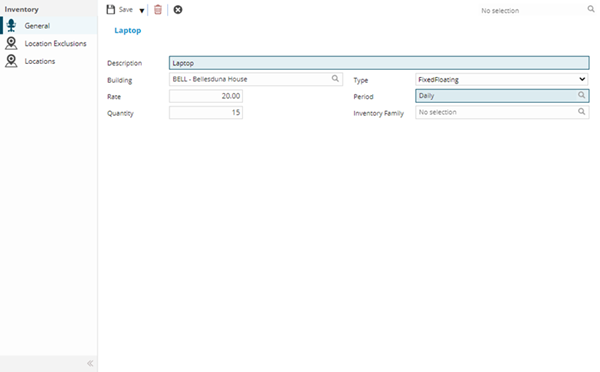
 Click to view - Inventory Fields and Descriptions
 Available from 7.0.0.0
Complete the fields and click Save  . Once the Inventory header has been completed and saved a sub navigation will appear to allow additional entities to be assigned.
These include:
- Location Exclusions
- Locations
Location Exclusions Sub Navigation
Click to view more detail.
Not all Inventory may be available in all Locations e.g. you may not be allowed to take a coffee maker into an IT room. Location Exclusions allow Inventory to be excluded from certain Locations.
Settings > Facilities Booking > Inventory Items
The link will open the Inventory / Location Exclusions grid. It is a grid view that can be customised and sorted as normal.
To assign Locations click Assign  , entities in the right hand assignment window are connected.
Locations Sub Navigation
Click to view more detail.
If the Inventory is fixed and has been assigned to a Location, it can be viewed from this grid.
Settings > Facilities Booking > Inventory Items
The link will open the Inventory / Location grid. It is a grid view that can be customised and sorted as normal.