Sales Credit Notes
Sales Credit Notes are used to provide clients with credit against previously issued invoices, supporting adjustments, corrections, or returns. The process for managing Credit Notes mirrors that of invoices: they must be activated, authorized (if using authorization levels), issued, and completed to ensure full auditability and compliance.
All Sales Credit Notes are centrally maintained in this section, enabling users to track, manage, and report on credits efficiently. This integration ensures that financial records remain accurate and that all credit transactions are fully traceable within the system.
Modules > Sales Invoicing > Sales Credit Notes
The link will open the Sales Credit Notes grid. It is a grid view which can be searched, sorted and customised as normal.
To add a new Sales Credit Notes click New  , to edit an existing Sales Credit Notes click Edit
  . A pop up window will appear which will allow the creation or amendment of a Sales Credit Notes.
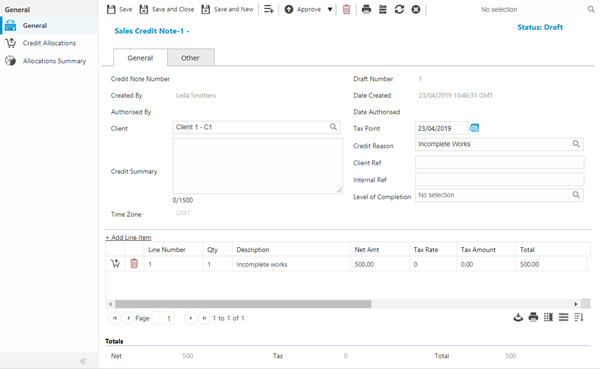
When Sales Credit Notes are processed and managed they are taken through certain stages.
- Upon creation the credit is Draft (a credit can be edited, recalculated and deleted at this stage)
- If using Authorisation levels and the User has insufficient authority levels at creation stage the credit will sit at Unauthorised (a credit can be edited, recalculated and deleted at this stage)until it is approved.
- Once the credit is ready to be sent to the client it must be activated. The credit will now show Approved, credits can be held at this stage until they are ready to be issued.
- Once at Approved the credit can be issued. The credit will now show as Issued (this will generate the Credit Note Number)
- Finally the credit can be completed.
 Click to view - Sales Credit Notes Fields and Descriptions
Click to view - Sales Credit Note other Tab Fields and Descriptions
Complete the fields and click Save  . Once the Credit Note header has been completed and saved a sub navigation will appear to allow additional entities to be assigned and viewed.
These include:
- Credit Allocations
- Allocations Summary
Credit Note Line items
Click to view more detail.
Line items need to be added to a Credit Note to reflect what is being credited, these line items can then be linked to Sales invoice line items to show what has been credited.
Modules > Sales Invoicing > Sales Credit Notes
To add a new Line Item click New  , to edit an existing Line Item click Edit . A pop up window will appear which will allow the creation or amendment of a Line Item.
Click to view - Sales Credit Note line items Fields and Descriptions
Credit Allocations
Click to view more detail.
Once a credit line item has been created it can be linked to a sales invoice line item. Once credit notes have been created, the credit can be allocated across the line items. Line items can be fully or part credited.
Modules > Sales Invoicing > Sales Credit Notes
The link will open the Sales Credit Note/ Credit Allocations grids. It is a two grid view, both grids can be sorted and customised as normal.
To assign Sales invoice line items click Assign  , entities in the right hand assignment window are connected.
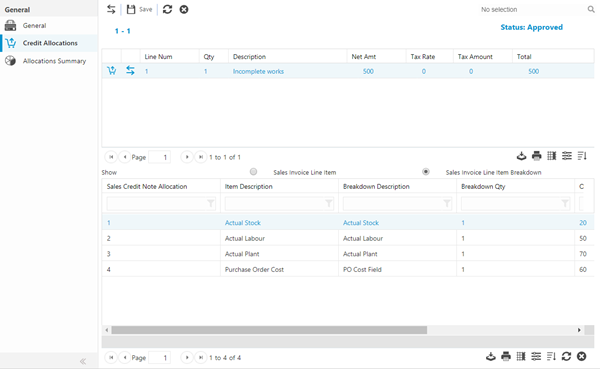
Once the sales invoice lines have bee assigned the amount to credit can be entered in the allocated total box. Clicking Allocate Line Item Values  will allocate the balance of the line.
Complete the fields and click Save .
Allocations Summary
Click to view more detail.
The Allocations summary screen gives a summary view of the credit and all of it allocations.
Modules > Sales Invoicing > Sales Credit Notes
The link will open the Sales Credit Notes / Allocations Summary grid. It is a grid view which can be searched, sorted and customised as normal.