Task Categories
Task Categories provide hierarchical classification structures for organizing tasks into high-level groupings. They support workload analysis, budget allocation, and performance measurement across service delivery streams.
Creating Task Categories: Create Category-level classifications with descriptive names and codes (for example, "Reactive Maintenance", "Planned Maintenance", "Projects", "Compliance", "Customer Requests"). You can then optionally create Sub-Categories beneath them (for example, under "Reactive Maintenance": "Emergency Repairs", "Routine Repairs", "Defect Corrections") by setting the Level field and Parent Category relationship.
Practical Example: Establish a "Building Services" category with sub-categories for "HVAC", "Plumbing", "Electrical", and "Lifts". This enables granular filtering when analysing maintenance spending by building system type.
Associating with Contracts: Task Categories must be associated with Contracts to become available for use. Navigate to the Associated Contracts sub-navigation to assign the categories to relevant contracts, enabling users working under those contracts to apply the categories to their tasks.
Key Benefits:
- Workload Analysis - Report on task volumes and costs by category to identify high-demand service areas
- Budget Management - Allocate maintenance budgets across categories like Reactive vs Planned work
- Performance Measurement - Track KPIs separately for different service delivery streams
- Operational Planning - Forecast resource requirements based on historical category volumes
Settings > Tasks > Task Categories
The link will open the Task Category grid. It is a grid view which can be searched, sorted and customised as normal.
To add a new Task Category click New  , to edit an existing Task Category click Edit
  . A pop up window will appear which will allow the creation or amendment of a Task Category.
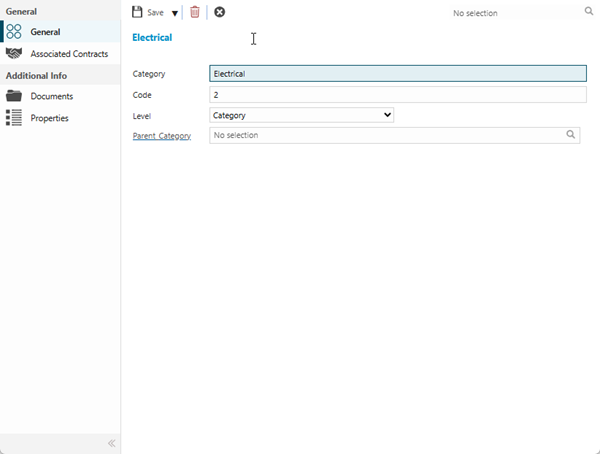
 Click to view - Task Category Fields and Descriptions
 Available from 7.0.0.0
Complete the fields and click Save  . Once the Task Category header has been completed and saved a sub navigation will appear to allow additional entities to be assigned.
These include:
- Associated Contracts
Associated Contracts
Click to view more detail.
Task Categories must be associated to the relevant Contracts to enable them for use within MRI Evolution.
Settings > Tasks > Task Categories
The link will open the Task Category / Associated Contracts grid. It is a grid view that can be customised and sorted as normal.
To assign Contracts click Assign  , entities in the right hand assignment window are connected.
To create Contracts see Contracts.