Tasks
Task User Preferences in MRI Evolution allow each user to customize how tasks are displayed and managed within the system. These preferences integrate with the task management workflow, enabling users to optimize their experience for efficiency and clarity.
For example, a user can set preferences for duplicate task checking, notification settings, or default task views, which the system will apply automatically. This helps users stay organized and reduces manual configuration.
The Task User Preferences are maintained here, supporting a tailored and productive task management environment.
Settings > User Settings > Tasks User Preferences
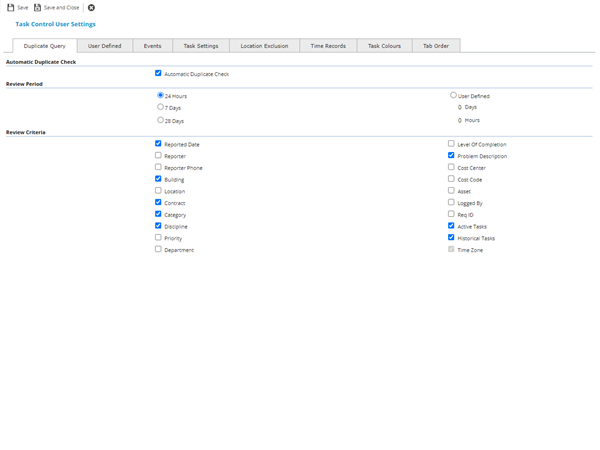
Duplicate Query Tab
 Click to view more detail.
MRI Evolution can check if a similar Task has already been raised on the Helpdesk by using the Duplicate Query User Preference.
Settings > User Settings > Tasks User Preferences
Click to view - Duplicate Query Tab Fields and Descriptions
User Defined Tab
Click to view more detail.
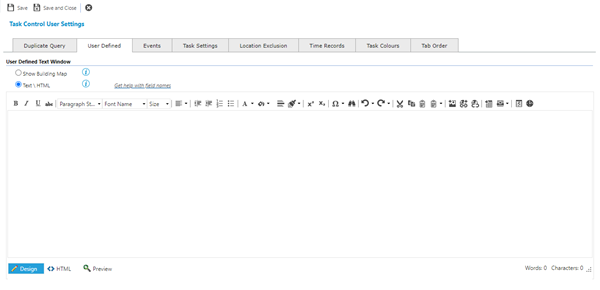
The User Defined Box in the Helpdesk can be used for many purposes but typical uses are to:
-
display a map showing the position of the Building where the Task is taking place
-
prompt Users with consistent Text e.g. steps for completing a call or a reminder to give out the Task ID before hanging up
Settings > User Settings > Tasks User Preferences
User Defined Tab Fields and Descriptions
| Field Name | Description |
|---|---|
| User Defined Text Window | |
| Show Building Map (radio button) |
Available from 5.9.0.0 Selecting this option will display in the Helpdesk, User Defined Box, a Map showing the position of the Building where the Task is taking place. The Building must have Latitude and Longitude co-ordinates in order to be displayed in the Map. |
| Text \ HTML (radio button) |
Available from 5.9.0.0 Selecting this option will display the User Defined Text or HTML entered in the box below, in the Helpdesk, User Defined Box. |
| User Defined Text |
Available from 5.9.0.0 Free text field - any Text or HTML entered here will be viewable in the User Defined Box of the Helpdesk, if the Text \ HTML radio button above is selected. It is possible to include data in fields from other entities linked to the Task, such as Building and Contract, in the text or html - See Help With Database Field Names below. |
| Entry Mode Toggle |
Available from 5.9.0.0 The field can be toggled between entering plain text that can be formatted using the toolbar buttons or entering/editing HTML, via the buttons located below the User Defined Text field. The toolbar buttons are disabled when in HTML mode.
|

Help With Database Field Names
The User Defined Text window can also display information taken from the current Task and its associated entities. For example, the window can display information taken from the Building, Contract or Asset associated with the Task. You can mix and match text values with database field values.
To set up your user defined text window to display database field values you will need to use specific notation to identify the Entity and Field you want to display. To include a field from the database you just need to specify the correct database field name surrounded by square brackets []. If you just want to display a value that's stored in the Tasks table then you only need to use the field name on its own. For example, to show the Task Seq of the current Task you would use the text [TA_SEQ].
As Evolution is a relational database it's common that a lot of the information you see on a single page is actually a combination of data pulled from lots of different linked database tables. Almost all fields from tables linked to the current Task can also be included in the User Defined Text Window. To include a field from an entity/table linked to the current Task you just need to specify the correct database field name preceded by the correct entity name and a full stop, e.g. [Building.BG_SITE].
The list of database fields that you can display is quite large and will grow as more fields are added to the database but here are some examples of common useful database field values and the correct notation to use:
| Entity | Table Notation | Examples | ||
| Field | Notation | Example Result | ||
| Task | Task Seq | [TA_SEQ] | 12726 | |
| Task Type | [TA_TASK_DESC] | BREAKDOWN | ||
| Sub Class | [TA_SUB_CLASS] | Service Charge | ||
| Building | Building | Building Address | [Building.BG_ADDRESS] | CAFM House, 126 FM Street, Essex`r`n |
| Post Code | [Building.BG_POSTCODE] | FM22 MRI | ||
| General Details | [Building.BG__GENERAL] | General notes about the building | ||
| Occupancy Type | [Building.BG_OCCUPANCY_TYPE] | Office Space - Occupied | ||
| User Defined 1 | [Building.BG_USER_DEF1] | One of 5 spare fields for user defined text | ||
| Local Authority | [Building.BG_LOCAL_AUTHORITY] | Basildon | ||
| Fire Authority | [Building.BG_FIRE_AUTHORITY] | Basildon | ||
| Police Authority | [Building.BG_POLICE_AUTHORITY] | Basildon | ||
| Water Authority | [Building.BG_WATER_AUTHORITY] | Essex Water | ||
| Site | Building.Site | Site Code | [Building.Site.BGP_CODE] | FM |
| Site | [Building.Site.BGP_NAME] | FM Office Space | ||
| Address | [Building.Site.BGP_ADDRESS] | 126 FM Street, Essex | ||
| Contact | [Building.Site.BGP_CNT_NAME] | MRI | ||
| Telephone | [Building.Site.BGP_CNT_TEL] | 01708 251900 | ||
| Country | [Building.Site.CountryLibraryId] | United Kingdom | ||
| Post Code | [Building.Site.Postcode] | FM22 MRI | ||
| Location | Location | Net Usable Space | [Location.LO_NET_SPACE] | 25000`r`n |
| Notes | [Location.LO_NOTES] | General notes about the location | ||
| Condition | [Location.LO_CONDITION] | 5 | ||
| Location URL | [Location.LocationUrl] | http://madeupurl/35735382.png | ||
| Contract | Contract | Contract Title | [Contract.CTR_REFERENCE] | Total FM Hard Services |
| Contract Reference | [Contract.CTR_CON_REF] | TFM-A1 | ||
| Supervisors | [Contract.CTR_SUPERVISORS] | Christine Kenny | ||
| Start Date | [Contract.CTR_START_DATE] | 01/01/2020 00:00 | ||
| End Date | [Contract.CTR_END_DATE] | 01/01/2026 00:00 | ||
| Notes | [Contract.CTR_NOTES] | General notes about the contract | ||
| Supplier | Contract.Supplier | Supplier Name | [Contract.Supplier.SUP_NAME] | Total FM |
| Supplier Code | [Contract.Supplier.SUP_CODE] | TFM | ||
| Correspondence Contact | [Contract.Supplier.SUP_CONTACT_1] | Paul Jones | ||
| Contact Telephone | [Contract.Supplier.SUP_TELEPHONE] | 01633 001010 | ||
| Web Address | [Contract.Supplier.SUP_WEB_ADDRESS] | TFMSolutionsGlobal.co.ac | ||
| Asset | Asset | Asset Code | [Asset.AR_CODE] | FM/AHU:823663 |
| Asset Description | [Asset.AR_DESCRIPTION] | Air Handling Unit | ||
| Manufacturer | [Asset.AR_MANU] | Daikin | ||
| Asset Comments | [Asset.AR_COMMENTS] | General notes about the Asset | ||
| Asset Tag | [Asset.AR_TAG] | AHU | ||
| Model | [Asset.AR_MODEL_TYPE] | Excell 3928 | ||
| Serial Number | [Asset.AR_SERIAL_NUMBER] | 9839797-923883-9982 | ||
| Breakdown Details | F_BD_DETAILS | Req. ID | [F_BD_DETAILS.BDET_CALL_ID] | Q12141 |
| Caller Source | [F_BD_DETAILS.BDET_CALLER_SOURCE] | Telephone Call | ||
| Email Address | [F_BD_DETAILS.BDET_EMAIL] | sally.fielding@address.no | ||
| Reporter | [F_BD_DETAILS.BDET_KEY_PERS] | Sally Fielding | ||
| Telephone | [F_BD_DETAILS.BDET_PHONE] | 0121 029 8000 | ||
| PPM Details | F_PPM_DETAILS | PPM Seq | [F_PPM_DETAILS.PDET_FKEY_PPM_SEQ] | 2928 |
| Period | [F_PPM_DETAILS.PDET_PERIOD] | 2022-10 | ||
Events Tab
Click to view more detail.
Checking the boxes on the Events Tab will cause MRI Evolution to auto-insert an Event when the checked action occurs.
Settings > User Settings > Tasks User Preferences
Click to view - Events Tab Fields and Descriptions
| Field Name | Description |
|---|---|
| Insert of Task on the Helpdesk | Check the box for MRI Evolution to auto-insert an Event when a Task is logged, the associated text box will form the body message of the Event. |
| Insert of Time Record | Check the box for MRI Evolution to auto-insert an Event when a Time Record is added to a Task, the associated text box will form the body message of the Event. |
| Change the Task to COMPLETE | Check the box for MRI Evolution to auto-insert an Event when a Task is moved to Complete, the associated text box will form the body message of the Event. |
| Change Task to HISTORY | Check the box for MRI Evolution to auto-insert an Event when a Task is moved to History, the associated text box will form the body message of the Event. |
| Task Printed | Check the box for MRI Evolution to auto-insert an Event when a Task is printed, the associated text box will form the body message of the Event. |
| Task Accepted |
Available from 5.5.0.0 Check the box for MRI Evolution to auto-insert an Event when a Task is accepted, the associated text box will form the body message of the Event. |
| Task Rejected |
Available from 5.5.0.0 Check the box for MRI Evolution to auto-insert an Event when a Task is rejected, the associated text box will form the body message of the Event. |
Task Settings Tab
Click to view more detail
The Task Settings options define how Tasks will behave.
The Helpdesk Settings check-box defines which version of the Helpdesk will be used to display a Task when it is opened from the Tasks grid.
Task Colouration options moved to a separate tab in version 5.0.0
Settings > User Settings > Tasks User Preferences
Click to view - Task Settings Tab Fields and Descriptions
In Version 5 the Task colouration rules were moved to their own tab: Task Colours
Location Exclusion
Click to view more detail.
Locations with certain statuses can be blocked by a User from appearing on the Helpdesk using Location Exclusion.
Settings > User Settings > Tasks User Preferences
Click to view - Location Exclusion Tab Fields and Descriptions
Time Records
Click to view more detail.
When entering Task times into Time Records, some of the information can be completed automatically using the calculations defined in the Time Records tab of the User Preferences.
Click to view - Time Records Tab Fields and Descriptions
Task Colours
Click to view more detail.
Tasks in the Task grid can be coloured according to how close they are to the most predominate SLA for the User
In version 5 the Task colouration rules were moved from Task Settings to a separate tab
Tab Order
Click to view more detail.
Some users prefer to use the tab key to move around the screen, MRI Evolution allows the User the ability to dictate the Tab order of the Helpdesk.
Settings > User Settings > Tasks User Preferences
Use the Move Up  and Move Down
  icons to set the Tab order.
Complete the fields and click Save and Close  .
.