Simple Helpdesk
MRI Evolution provides two Helpdesk windows; the Simple Helpdesk and Helpdesk. The Simple Helpdesk provides all the basic functionality required for logging and updating Helpdesk calls, whereas the main Helpdesk has many more advanced features.
Users with the necessary permissions can choose which Helpdesk to use via the Use Advanced Helpdesk setting in the Task User Preferences page:
-
with the check-box unticked, the Simple Helpdesk will open from the Tasks grid (creating new and managing existing Tasks) as well as the menu option: Task Management > Helpdesk
 Available from 7.0.0.0
Styling improvements have been made to the Simple Helpdesk to improve the appearance and to align with MRIs styling standards.
Helpdesk - Simple
The link will open a pop up window containing the Helpdesk.
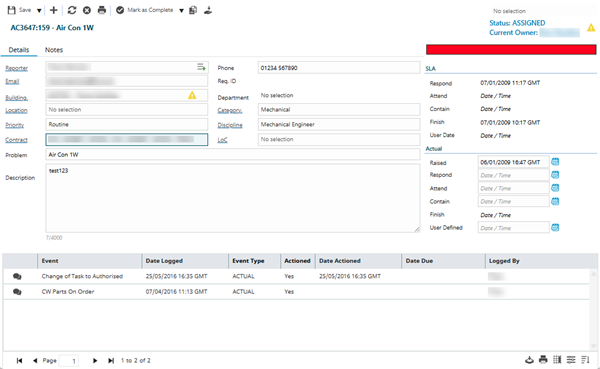
 Click to view - Helpdesk Fields and Descriptions
Complete the fields and click Save  . Once the Helpdesk header has been completed and additional Icons will appear to allow additional actions to the Task.
Helpdesk Additional Icons
| Icon | Feature | Description |
|---|---|---|

|
Job Card |
Click to print the Job Card. |

|
Mark Task as Complete | Click to move the Tasks status to Complete. |

|
Sign off Task to History | Click to move the Tasks status to History. |

|
Mark Task as Active | Click to move the Task back to Active - all Resources must be removed from this action to occur. |

|
Cancel Task |
Click to Cancel the Task. The capability to restore Cancelled Tasks was added in Version 4.4.7 |
|
|
Restore Task |
Available from 5.5.0.0 Click to restore the Task to the State it was prior to being sent to Rejected, History or Cancelled. |

|
Bulk Copy Task | Click to create multiple copies of the Task. |

|
Take Ownership | Click to take ownership of the Task. |