Rates Register
Rates Registers are used to record details of any Business Rates paid against Buildings or Locations.
The list of Rates Registers are maintained here.
 Available from 7.0.0.0
The Purchase Key licence dependency for this specific element of the system has been removed and is now included as standard in the core MRI Evolution product the feature has been turned on for all systems by default.
Note: Other restrictions, such as User licence type restrictions and / or any restrictions to underlying functionality that is dependent upon Purchase Key licences will remain in place.
Facilities > Property and Estates > Rates Register
The link will open the Rates Register grid. It is a grid view which can be searched, sorted and customised as normal.
To add a new Rates Register click New  , to edit an existing Rates Register click Edit
  . A pop up window will appear which will allow the creation or amendment of a Rates Register.
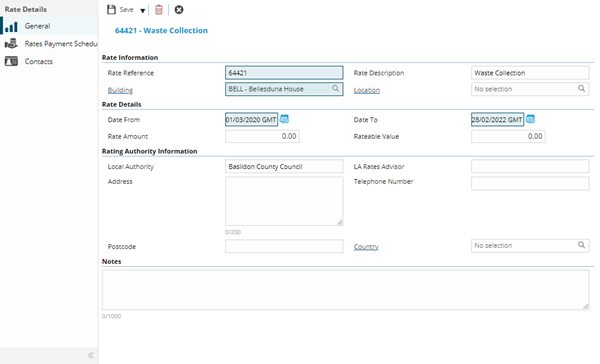
 Click to view - Rates Register Fields and Descriptions
Complete the fields and click Save  . Once the Rates Register header has been completed and saved a sub navigation will appear to allow additional entities to be assigned / created.
These include:
- Rates Payment Schedule
- Contacts
Rates Payment Schedule
Click to view more detail.
If Rates are due to be paid on a schedule the schedule can be recorded here.
Facilities > Property and Estates > Rates Register
The link will open the Rates Register / Rates Payment Schedule grid. It is a grid view that can be customised and sorted as normal.
To add a new Rates Payment Schedule click New , to edit an existing Rates Payment Schedule click Edit . A pop up window will appear which will allow the creation or amendment of a Rates Payment Schedule.
Click To view - Rate Payment Schedule Fields and Descriptions
| Field Name | Description |
|---|---|
| Rate Details | |
| Due Date | The date the rates are due. |
| Amount | The cost of the rate due. |
Contacts
Click to view more detail.
Additional contacts can be assigned to the Rates Register, these are connected from the Contacts lists.
Facilities > Property and Estates > Rates Register
The link will open the Rates Register / Contacts grid. It is a grid view which can be searched, sorted and customised as normal.
To assign Contacts click Assign  , entities in the right hand assignment window are connected.
To create Contacts see Contacts
Rate registers can also be created and amended from the Building or Location entity.