Task Event Types
Templates for common Task Events enabling rapid entry with pre-populated default values. Can be flagged as Mitigating Events for ISM Module reporting.
Ensures consistent event recording and saves time during task lifetime. See Task Events and ISM Module for usage.
Settings > Tasks > Task Event Types
or
Settings > Event Types > Task Event Types
If using the ISM module Task Event Types can also be added from Settings > Integrated services > Task Event Types
The link will open the Task Event Types Grid. It is a grid view which can be searched, sorted and customised as normal.
To add a new Task Event Type click New  , to edit an existing Task Event Type click Edit
  . A pop up window will appear which will allow the creation or amendment of a Task Event Type.
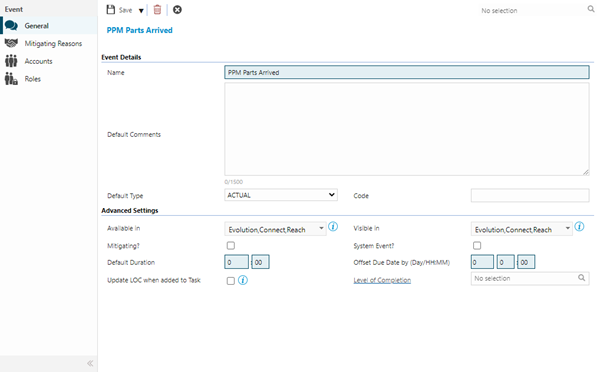
 Click to view - Task Event Type Fields and Descriptions
Complete the fields and click Save  . Once the Task Event header has been completed and saved a sub menu will appear to allow additional entities to be assigned.
These include:
- Mitigating Reasons - ISM Module only
- Accounts
- Roles
Mitigating Reasons - ISM module
Click to view more detail.
From the Integrated Services screen a Task can be paused and restarted, Task Events can be used to record reasons for the pausing or cancelling of a Task. They can also be applied to indicate a mitigating circumstance.
Settings > Event Settings > Task Event Types
The link will open the Task Event / Mitigation Reasons / Contracts Grid. It is a Grid view that can be customised and sorted as normal.
From the Type drop down select the Task Action to initiate the mitigating event:
- Time Record Alteration
- Cancel Task
- Mitigating Circumstances (Task Pause / Restart)
The Contracts for these to occur on must then be assigned. To assign Contracts click Assign  , entities in the right hand assignment window are connected.
Accounts
Click to view more detail.
Task Event Types can be assigned to Accounts, if this is done only the assigned User Accounts will be able to select the Task Event Type when adding a Task Event to Tasks.
Settings > Event Settings > Task Event Types
The link will open the Task Event Types / Accounts Grid. It is a Grid view that can be customised and sorted as normal.
By default all Task Events are assigned to all Accounts. To assign Accounts click Assign , entities in the right hand assignment window are connected.
To create Accounts see User Accounts.
Roles
Click to view more detail.
Task Event Types can be assigned to Roles, if this is done only the assigned Roles will be able to select the Task Event Type when adding a Task Event to Tasks.
Settings > Event Settings > Task Event Types
The link will open the Task Events / Roles Grid. It is a Grid view that can be customised and sorted as normal.
By default all Task Events are assigned to all Roles. To assign Accounts click Assign , entities in the right hand assignment window are connected.
To create Roles see Roles.