Roles
Roles allows administrators to create comprehensive user access profiles that combine permissions, authorization ranges, resource assignments, and module-specific access rights. Beyond basic security permissions, roles control authorization limits for tasks and purchases, access to bookable locations and buildings, document repositories, published reports, and module functionality, enabling complete user experience management through standardized role-based configurations.
Settings > User Accounts > Roles
or
Settings > System Administration > User Accounts & Security > Roles
The link will open the Roles grid. It is a grid view which can be searched, sorted and customised as normal.
To add a new Role click New  , to edit an existing Role click Edit
  . A pop up window will appear which will allow the creation or amendment of a Role.
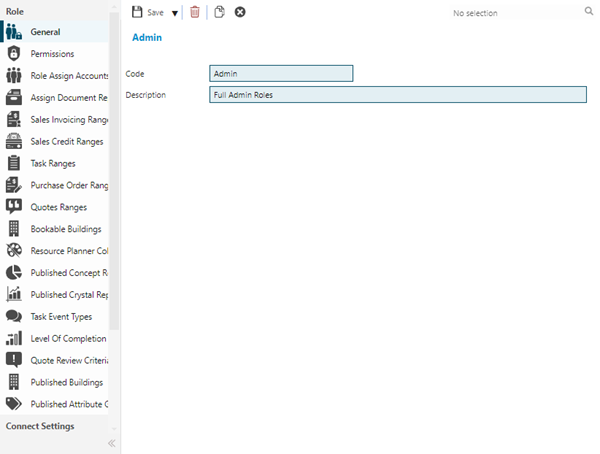
 Click to view - Roles Fields and Descriptions
Complete the fields and click Save  . Once the Role Header has been completed and saved sub navigations will appear to allow additional entities to be assigned.
Permissions Sub Navigation
Click to view more detail.
Once the Role header has been completed, the Role must have their Permissions, also known as Securables, defined.
Permissions/Securables set against the Role control the access of the User Accounts assigned with the Role to areas of MRI Evolution and what actions they can carry out within those areas.
Permissions are organised by function or system entity into Securable Groups. MRI Evolution's suite of web services have their own set of Securables within the relevant Securable Groups.
Settings > Accounts > Roles
From the drop downs select the required Securable Group and where applicable the Database, check the appropriate boxes to reflect the desired Permissions for the User Accounts assigned with the Role within MRI Evolution. Users will inherit the Securables defined against the assigned Role when logging in.
Securables need to be set for each Securable Group in turn.
A Permission can be set to allow or deny a User Account as follows:
- Create: Inserting new records
- Read: Viewing data, but not changing it
- Update: Editing existing records
- Delete: Removing records
- Allow: A specified Action is allowed or denied, such as "Change Asset Status"
All Permissions have three toggle-able settings, in the following sequence:
-
 Checked : The option is available to the Role's associated Users, unless overridden by the same Permission set to Crossed for a specific User
 -
 Crossed : The option is denied and not available to the Role's associated Users, even if it has been set as Checked for a specific User
 -
 Blank : The option is not available to the Role's associated Users, unless overridden by the same Permission set to Checked for a specific User
Setting Securables within a Securable Group
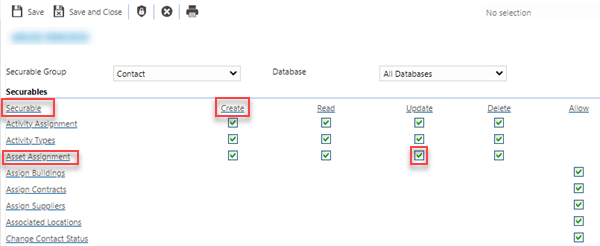
Clicking the Securable hyper-link, highlighted below, will toggle every Securable in the Securable Group to the next setting in the sequence.
Clicking a column heading, such as the Create hyper-link below, will toggle every Create Securable in the Securable Group to the next setting in the sequence.
Clicking a row heading, such as the "Asset Assignment" hyper-link below, will toggle every Securable in the row to the next setting in the sequence.
Clicking an individual Securable box, such as the Update below, will toggle the value to the next setting in the sequence.
Clicking the Assign All Permissions toolbar button will check every Securable in every Securable Group - It may not be advisable to use this since it grants full access to every area of MRI Evolution.
MRI Evolution takes into account all Permissions defined for a User. These could be set directly against their User Account or inherited from any Roles assigned to their account.
| Additional Icons | Name | Description |
|---|---|---|

|
Copy |
Available from 6.1.2.0 Click to make a copy of the existing Role. All Role configuration information will be copied with the exception of the assignment of Roles to Accounts. |

|
Assign All Permissions |
Checks all Account Permissions for every Securable Group. Available from 5.7.0.0 The user will be prompted to confirm they want to do this prior to assigning all Permissions: "Are you sure you want to apply all Permissions to this Account or Role?" |

|
Roll Permissions Report | Click to run the AC-002 Roles Permissions report for the current Role record. |
Other Assignments
Click to view more detail.
A Role can also be assigned to other Entities and Modules within MRI Evolution. Not all Assignments will be available, as some are dependant the Module being purchased.
The Role can be connected to:
| Assignment | Function |
|---|---|
|
Role Assign Accounts |
Allows Assignment to available User Accounts. |
|
Assign Document Repositories |
Allows Assignment to available Document Repositories. |
|
Sales Invoicing Ranges |
Allows Assignment to Sales Invoicing Authorisation Ranges - Sales Invoicing Module specific. |
|
Sales Credit Ranges |
Allows Assignment to Sales Credit Authorisation Ranges - Sales Invoicing Module specific. |
| Allows Assignment to Task Authorisation Ranges - if Task Authorisation Preferences have not been set to "Ranges applied to Contracts for Tasks" this will allow the assignment of Generic Task Authorisation Ranges. | |
|
Purchase Order Ranges |
Allows Assignment to Purchase Order Authorisation Ranges- Purchase Order Module specific. |
|
Quotes Ranges |
Allows Assignment to Quotes Authorisation Ranges - Quotes Module specific. |
| Bookable Buildings | Allows Assignment to Bookable Buildings - Buildings that contain Locations that can be booked via the Facilities Booking Module |
|
Resource Planner Colours |
Allows Assignment to Resource Planner Colour Sets. |
|
Published Concept Reports |
Allows Assignment to Published Concept Reports. |
|
Published Crystal Reports |
Allows Assignment to Published Crystal Reports - Crystal Connect Module specific. |
|
Task Event Types |
Allows Assignment to Task Event Types. |
|
Level Of Completion |
Allows Assignment to Task Levels of Completion. |
|
Quote Review Criteria |
Allows Assignment to Cost Centres for Quotes Review Criteria - Quotes Module specific. |
|
Published Buildings |
Allows Assignment to Published Buildings - Evolution Connect specific |
| Published Attribute Groups | Allows Assignment to Published Attribute Groups |
| User Defined Lookup |
Allows the Assignment of Tasks User Defined Lookups to the Role. Assigning / Publishing works the same way as publishing Level Of Completions:
Publishing does not stop users from seeing entities where the User Defined Lookup has been set. It only controls their ability to select User Defined Lookups in auto-completes and editable grids. |
| Connect Settings | |
|
Published Suppliers |
Allows Assignment to specific Suppliers - Evolution Connect specific |
| Reach Settings | |
|
Bookable Locations |
Allows Assignment to Bookable Locations - Evolution Reach specific, assign Users access to the Locations where Facilities Bookings can be made through Evolution Reach. |
|
Menu Permissions |
Allows Assignment to Evolution Reach Menu - Evolution Reach specific, check the menu boxes to allow the User access to the relevant Evolution Reach pages. |
|
Standalone Widgets |
Allows Assignment to Standalone Widgets - Evolution Reach specific |
 Available from 7.0.0.0