Catering Menus
Catering Menus define food and beverage items available for Facilities Bookings.
Create menu items with names, descriptions, units, and prices. Organize items into menus and specify location availability. Menus can be selected when creating Facilities Bookings to include catering in event planning and costing.
Settings > Facilities Booking > Catering Menus
The link will open the Catering Menus grid. It is a grid view which can be searched, sorted and customised as normal.
To add a new Catering Menu click New  , to edit an existing Catering Menu click Edit
  . A pop up window will appear which will allow the creation or amendment of a Catering Menu.
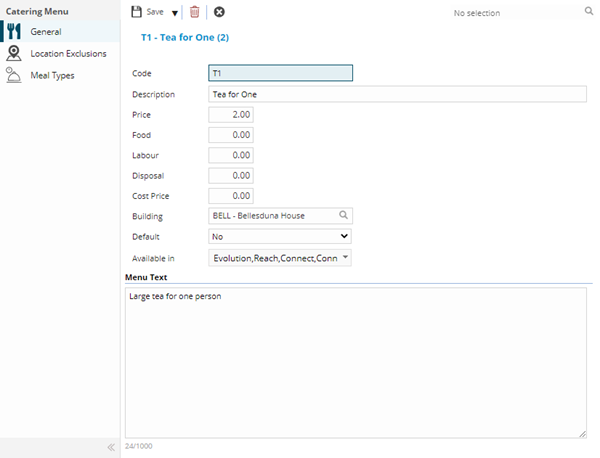
 Click to view - Catering Menu Fields and Descriptions
 Available from 7.0.0.0
Complete the fields and click Save  . Once the Catering Menu header has been completed and saved a sub navigation will appear to allow additional entities to be assigned.
These include:
- Location Exclusions
- Meal Types
Location Exclusions Sub Navigation
Click to view more detail.
Certain Catering may only be available in certain Locations. Location Exclusions allow Catering Menus to be excluded from certain Locations.
Settings > Facilities Booking > Catering Menus
The link will open the Catering Menus / Location Exclusions grid. It is a grid view that can be customised and sorted as normal.
To assign Location Exclusions click Assign  , entities in the right hand assignment window are connected.
To create Locations see Location Register.
Meal Types Sub Navigation
Click to view more detail.
Meal types can be assigned to Catering Menus to mark up if a Menu meets a meal type criteria e.g. it is vegan
Settings > Facilities Booking > Catering Menus
The link will open the Catering Menus / Meal Type grid. It is a grid view that can be customised and sorted as normal.
To assign Meal Types click Assign , entities in the right hand assignment window are connected.
To create Meal Types see Meal Types.