Mobile Audit Templates
The Mobile Audit Templates feature in Evolution Go allows organizations to design and manage audit templates for use on mobile devices. These templates define the audit name, type, and questions, enabling field users to complete structured audits efficiently and consistently.
Mobile Audits can be created and accessed through the Helpdesk - Mobile Audits sub navigation or from the Mobile Audits grid in the Modules menu.
Administrators can maintain the list of Mobile Audit Templates here, ensuring that audit processes are standardized and easily deployed to mobile users.
Settings > Evolution Go > Mobile Audit Templates
or
Settings > Mobile Audits > Mobile Audit Templates
The link will open the Mobile Audit Templates grid. It is a grid view which can be searched, sorted and customised as normal.
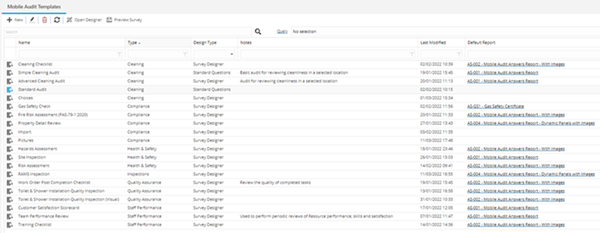
Mobile Audit Template Grid Icons
 Click to view more detail.
|
Icon |
Feature | Description |
|---|---|---|
|
|
New | Click to add a new Mobile Audit Template record. |

|
Edit | Select a record in the grid and click to edit the selected record. |
|
|
Delete | Select a record in the grid and click to delete the selected record. |

|
Refresh | Click to refresh the grid. |
|
|
Open Designer |
Available from 5.6.0.0 The Open Designer toolbar button will open a pop-up page containing the same Survey designer as used in Work Access Survey Templates and Supply Chain Survey Templates, for the selected Mobile Audit Template.
|

|
Preview |
Available from 5.6.0.0 The Preview toolbar button will open a pop-up page containing the Survey designer for the selected Mobile Audit Template . The page will open in the Test Survey mode, allowing the MRI Evolution user to run through the audit as it would appear to Evolution Go users.
|

To add a new Mobile Audit Template click New  , to edit an existing Mobile Audit Template, select a record in the grid and click Edit .
A pop up window will appear which will allow the creation or amendment of a Mobile Audit Template.
Mobile Audit Templates Fields and Icons
Click to view more detail.
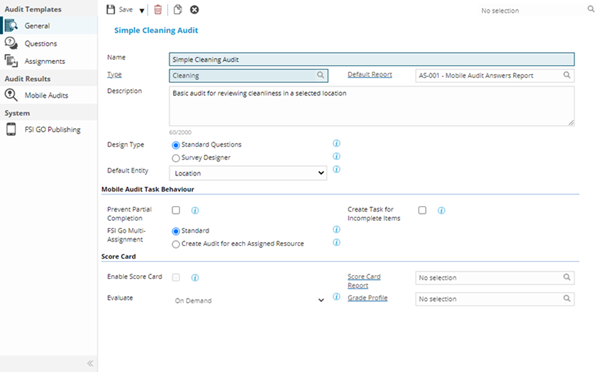
| Field Name | Description |
|---|---|
| Name | The name of the Mobile Audit Template. |
| Type |
From the drop down select the Mobile Audit Type - for more information see - Mobile Audit Types The field label is a hyper-link to open the Audit Type directly. |
| Default Report |
Available from 5.7.0.0 Select the most appropriate Concept Report to display the Results of the Mobile Audit, when printed. |
| Description | The description of the Mobile Audit Template. |
| Design Type |
Available from 5.6.0.0 Radio button options: Select the Standard Questions design type to manually build the Audit Template Questions using the Questions sub-navigation page and input panel. Select the Survey Designer to create the Audit Template Questions and behaviour using the drag and drop Survey Designer. In order to view/answer Mobile Audits designed using the Survey Designer your Evolution Go users must be on the following activity versions: For Tasks, v6.0 or above. For Audit Now, v3.0 or above. Changing the Design Type of the Mobile Audit Template will delete any pre existing Questions created using the previous Design Type. |
| Default Entity |
Available from 5.6.0.0 If applicable, select the Entity that the current Audit Template will usually be carried out against, e.g. Building, Location, Asset. The field is optional and can be used to:
|
| Mobile Audit Task Behaviour | |
| Prevent Partial Completion |
Available from 5.7.0.0 Check this box if you would like to make it compulsory for assigned auditors to complete a set of answers for ALL items contained in the audit. This functionality is only available in the following Evolution Go activity versions: For Tasks, v6.0 or above. For Audit Now, v3.5 or above. |
| Create Task for Incomplete Items |
Available from 5.7.0.0 Check this box if you would like the system to automatically create a brand new Task and an audit when partially completed audits are returned from Evolution Go. The new audit will contain all incomplete Items from the original audit. Leave this box unchecked if you prefer to reassign the original Task to a different Resource in order to capture the missing items. This functionality is only available in the following Evolution Go activity versions: For Tasks, v6.0 or above. For Audit Now, v3.5 or above. |
| Evolution Go Multi-Assignment |
Available from 5.7.0.0 Radio button options:
Standard - A single version of the mobile audit will be sent to any assigned Evolution Go Resource. When multiple Resources are assigned each submitted answer will be recorded against a single copy of the audit question. Create Audit for each Assigned Resource - A distinct copy of the Mobile Audit, Items and Questions will be created for each assigned Resource. The submitted answers and results will be recorded separately for each Resource. This functionality is only available in the following Evolution Go activity versions: For Tasks, v6.0 or above. For Audit Now, v3.5 or above. |
| Score Card | |
| Enable Score Card |
Available from 5.7.0.0 Check this box to enable Score Card evaluation for Mobile Audits that use this Template. If enabled, the system will calculate Scores and Grades for Audits and Audit Items that use this template. This feature is only available when the Design Type is Survey Designer. |
| Score Card Report |
Available from 5.7.0.0 Select the most appropriate Concept Report to display the Score Card results of the Mobile Audit, when printed. This feature is only available when the Design Type is Survey Designer. |
| Evaluate |
Available from 5.7.0.0 Select whether you want the system to calculate Scores and Grades for audits On Demand or automatically On Completion:
This feature is only available when the Design Type is Survey Designer. This functionality is only available in the following Evolution Go activity versions: For Tasks, v6.0 or above. For Audit Now, v3.5 or above. |
| Grade Profile |
Available from 5.7.0.0 Select the most appropriate Grade Profile to use for the Mobile Audits created from the current Mobile Audit Template. This field is only available when the Enable Score Card check-box is checked. |
Complete the fields and click Save  . Once the Mobile Audit Template header has been completed and saved, a Questions sub navigation will appear to allow audit Questions to be created and maintained.
Mobile Audit Template - General Icons
Click to view more detail.
|
Icon |
Feature | Description |
|---|---|---|
|
|
Save Button Group |
|
|
|
Delete | Click to delete the current record |

|
Copy | Click to make a copy of the current record |
|
|
Survey button group |
Available from 5.6.0.0 These buttons will only be displayed when the current Mobile Audit Template has been saved with a Design Type of Survey Designer
The Open Designer toolbar button will open the Survey Designer pop-up, for the current Mobile Audit Template. The Preview toolbar button will open a pop-up page containing the Survey Designer for the current Mobile Audit Template . The page will open in the Test Survey mode, allowing the MRI Evolution user to run through the audit as it would appear to Evolution Go users. |

|
Close | Click to close the input panel. |
Survey Designer
Click to view more detail.
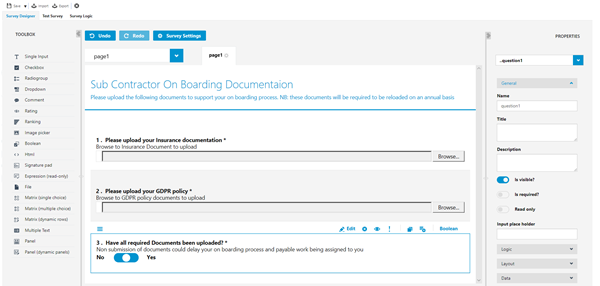
Use the Survey settings to create a title and the general description for the survey.
Use the Toolbox to create the questions, file uploads, drop downs, ratings etc..... to create the survey detail.
Available from 5.6.0.0
Matrix (single choice)
- Matrix (multiple choice)
- Matrix (dynamic choice)
- Panel (dynamic)
- Multiple Text
Available from 5.6.0.0
- Panels
- Expression (read-only)
- Comment
Available from 5.6.0.0
 and
and  toolbar buttons allow users to export the JSON file (containing the Questions and so on) from an existing Survey and import it to another Survey, thus saving time when creating multiple similar Surveys.
Once the Survey has been created click Save.
Questions Sub Navigation
Click to view more detail.
Mobile Audit Template Questions are the questions that will be answered by the Evolution Go User.
Settings > Evolution Go > Mobile Audit Templates - Questions
The link will open the Mobile Audit Templates / Questions grid. It is a grid view which can be searched, sorted and customised as normal.
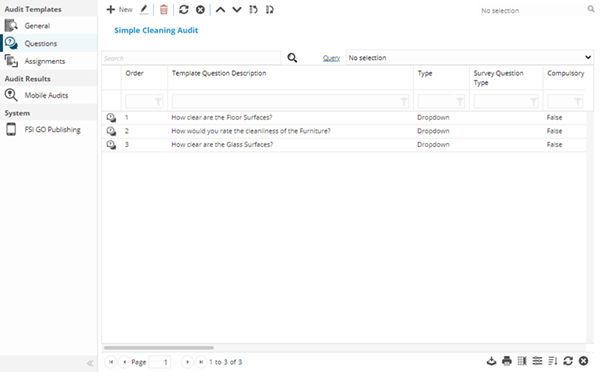
The functionality of the Question sub navigation is dependent on the setting of the Design Type of the Mobile Audit Template.
- Standard Questions - Questions can be created, edited, deleted and the order changed
- Survey Designer - The Questions are read only. No changes can be made from the grid. The Survey Designer page is used to make changes
Available from 5.7.0.0
The Questions sub navigation has been updated as follows:
- Default columns updated
- Search and Query Functions enabled
- Column Filters enabled
'Standard Question' Question Grid and Input Panel
Click to view more detail.
'Standard Questions' Grid Toolbar Buttons
|
Icon |
Feature | Description |
|---|---|---|
|
|
New | Click to add a new Question. |
|
|
Edit | Select a record in the grid and click to edit the selected record. |

|
Delete | Select a record in the grid and click to delete the selected record. |
|
|
Refresh |
Click to refresh the grid. |
|
|
Close | Click to close the input panel. |

|
Move Up | Select a record in the grid and click to move the selected record up one place in the order. |

|
Move Down | Select a record in the grid and click to move the selected record down one place in the order. |

|
Move First | Select a record in the grid and click to move the selected record to the first place in the order. |

|
Move Last | Select a record in the grid and click to move the selected record to the last place in the order. |
To add a new Question click New , to edit an existing Question click Edit . A pop up window will appear that allows the creation or amendment of a Question.
'Standard Questions' Input Panel
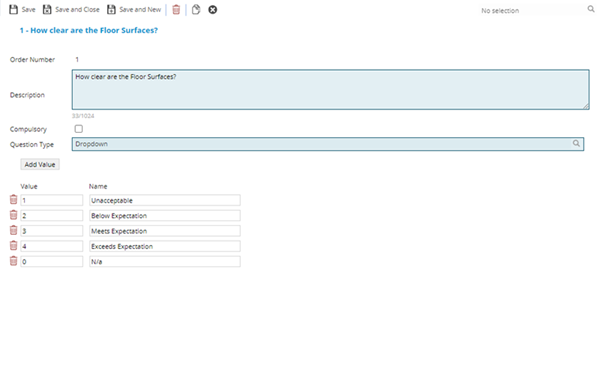
| Field Name | Description |
|---|---|
| Order Number | Auto-populated with the order number of the question. |
| Description | The descriptive text of the question. |
| Compulsory | Check the box if the question must be answered before the Task can be completed in Evolution Go. |
| Question Type |
From the drop down select the question Type:
|
 button will be displayed, click the button to enter a Value and Name that will be available to select from the drop-down list, repeat until the required number of values have been added
'Survey Designer' Grid
Click to view more detail.
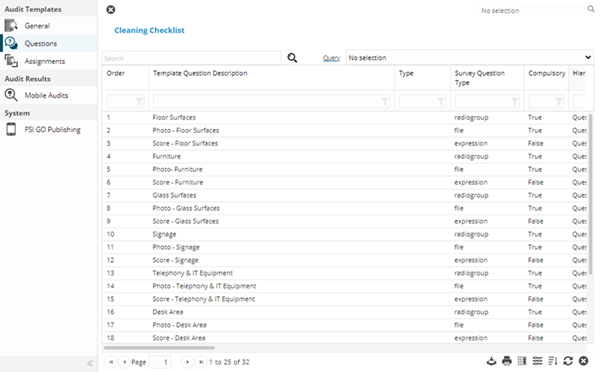
When the Mobile Audit Template has been saved with a Design Type of Survey Designer, the Questions grid effectively becomes a 'read only' grid.
All of the adding new, changing the order and editing of Questions has to be carried out by opening the Survey Designer. Therefore the toolbar buttons are hidden, with the exception of the Close button.
The grid can still be personalised.
Assignments Sub Navigation
Click to view more detail.
Available from 5.7.0.0
The Assignments sub navigation contains a grid of all the MRI Evolution entities that have been assigned to the current Mobile Audit Template.
For example if a Cleaning Mobile Audit has been assigned to five Locations, these will be listed in the grid.
The Assignments defined here appear in the Evolution Go Audit Now activity v3.5 or above as a way to suggest appropriate audits for a selected or scanned entity.
Settings > Evolution Go > Mobile Audit Templates - Assignments
The link will open the Mobile Audit Templates / Assignments grid. It is a grid view which can be searched, sorted and customised as normal.
Clicking the  button will open an assignment window listing records for the Entity defined by the Default Entity field for the current Mobile Audit Template
Mobile Audits Sub Navigation
Click to view more detail.
Available from 5.7.0.0
The Mobile Audits sub navigation contains a grid of all the Mobile Audit instances associated with the current Mobile Audit Template.
Settings > Evolution Go > Mobile Audit Templates - Mobile Audits
The link will open the Mobile Audits grid. It is a grid view which can be searched, sorted and customised as normal.