Invoicing Rate Groups
Hierarchical rate matrices for discipline-based invoicing. Time Records are processed through node properties until a match is found, determining the billing rate applied. Configure groups to establish automated rate determination based on discipline, client, contract, or resource criteria.
Settings > Sales Invoicing > Invoicing Rates Groups
The link will open the Invoicing Rate Groups grid. It is a grid view which can be searched, sorted and customised as normal.
To add a new Invoicing Rate Group click New  , to edit an existing Invoicing Rate Group click Edit
  . A pop up window will appear which will allow the creation or amendment of a Invoicing Rate Group.
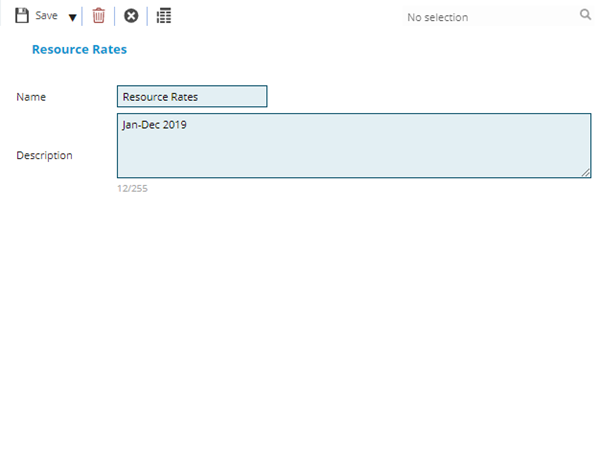
 Click to view - Invoicing Rate Groups Fields and Descriptions
Complete the fields and click Save  . Once the Invoicing Rate Group header has been completed and saved an additional icon will appear, click Rate Matrix
  . A pop up window will appear that allows the creation of a rate matrix.
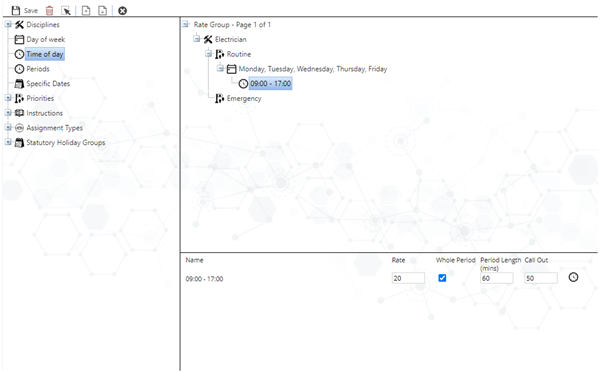
The left window of the Discipline matrix shows the palette which contains the types of node that can be used. The top right window shows the Discipline Matrix. The bottom right window allows the node properties to be set.
MRI Evolution will work through the matrix looking for matches e.g. was the Task completed by a Mechanic on a Monday between 09:00 and 17:00.
If the answer to any of the above is Yes MRI Evolution will look to the node properties to associate costs.
MRI Evolution will continue to work down the Discipline Matrix tree until no more matches are found.
Click to view Node definitions


Click to view Node Property definitions
Once the Invoicing Rate matrix is completed it can be referenced to generate sales invoices. Invoices can now be generated using a Task based Sales Invoicing Rule Group