Customer Service Desk
Available from 4.10.0.0
The Customer Service Desk page provides a 'Contact centric' view of Tasks, typically to call centre or help desk operators dealing with queries.
The page was initially developed to meet the requirement of integrating MRI Evolution with CTI call management software but can also be used by MRI Evolution users without the call management software.
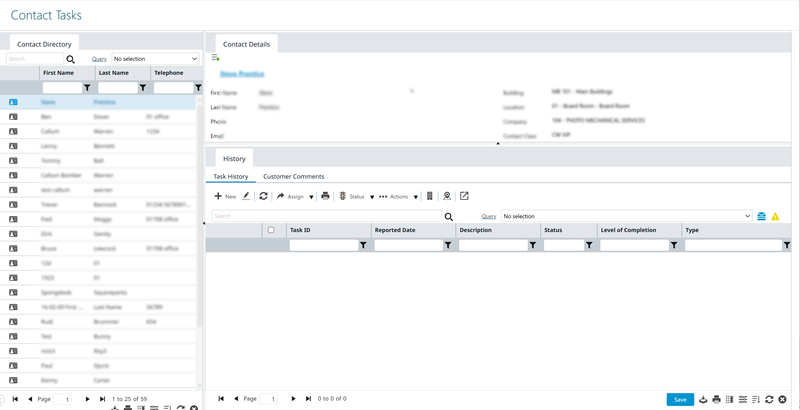
The page is made up of three collapsible and resizeable panes, allowing users to adjust the screen elements to suit their needs:
- Contact Directory pane on the left containing a Contacts grid
- Contact Details pane, top-right, displaying a read-only ‘summary’ version of the Contact input panel for the Contact selected in the left pane
- History pane, bottom-right, containing two tabs, each tab displays a grid of records related to the Contact selected in the left pane
 Available from 7.0.0.0
The Purchase Key licence dependency for this specific element of the system has been removed and is now included as standard in the core MRI Evolution product the feature has been turned on for all systems by default.
Note: Other restrictions, such as User licence type restrictions and / or any restrictions to underlying functionality that is dependent upon Purchase Key licences will remain in place.
Available from 7.0.0.0
The following changes have been made to the History pane of this page:
-
The order of the two tabs have been reversed, the pane will now open on Task History rather than Customer Comments tab
-
The toolbar buttons have been updated as follows:
-
The Ownership Toolbar icons have been organised into an Actions Group
-
An Assign Ownership button has been added along with the associated functionality
-
Available from 7.0.0.0
This function will now open in the same window as MRI Evolution, instead of a separate window, by default.
Users will still have the option to open the function in a separate window.
Either the Close  button will be hidden and the Open in new window
  button will be displayed or vice versa, depending on whether the page is opened in a page of its own, or not.
Task Management > Customer Service Desk
The link will open the Customer Service Desk page.
Customer Service Desk - Contact Directory pane
 Click to view more detail.
The Contact Directory pane is located on the left of the page, it contains a Contacts grid and is the starting point in the logical flow of the page.
The main purpose of the pane is to allow users to enter criteria in order to narrow the Contacts displayed in the grid and identify the Contact in question. This can be achieved using either, or possibly both, of the following:
- an automated query based upon the parameter(s) passed to the page by the call management software
- a manual search using the Search field and grid column filters to identify the appropriate Contact
Contact visibility in the Contact Directory pane can be controlled by a Tasks Query. Only those Contacts that meet the criteria of the Tasks Query will be visible to users. If no Tasks Query is defined then no restrictions will be applied and all Contacts will be visible to users.
Select the appropriate Contact in the grid in order to populate the Contact Details and History panes with values.
If a Contact does not exist in the system, it can be added in the Contact Details pane.
The Personalise grid button will be disabled in the pane when the page is opened via call management software.
Click to view - Contact Directory Fields and Descriptions
Customer Service Desk - Contact Details pane
Click to view more detail.
The Contact Details pane is located top-right of the page and displays a read-only ‘summary’ version of the Contact input panel for the Contact selected in the left pane grid.
Selecting different Contacts in the left pane will automatically change the Contact's details displayed here.
A new Contact can be added by clicking the  button, a 'quick add' pop-up will open to facilitate this.
The 'full' Contact page can be opened by clicking the name hyper-link in order to see more details and update if necessary.
Click to view - Contact Details Fields and Descriptions
Customer Service Desk - History pane
Click to view more detail.
The History pane is located bottom-right of the page and contains two tabs, each tab displays a grid of records related to the Contact selected in the left pane grid:
- Task History - grid of Tasks where the currently selected Contact is the main reporter or one of the multiple reporters of the Task, regardless of the Building or Location of the Tasks
- New Tasks can be added from here by clicking the
 button to open the helpdesk, the currently selected Contact's details will be passed to the helpdesk and fields pre-filled
 - Existing Tasks can be viewed / updated as necessary via opening the Task record and using the toolbar buttons
- Two alternative views of Tasks can be toggled on and off, overriding the criteria for displaying Tasks:
- Show Tasks in Contact's Building:
- Toggled on - The grid will show Tasks against the Building associated with the currently selected Contact, regardless of the reporter
- Toggled off - The grid will show Tasks where the currently selected Contact is the main reporter or one of the multiple reporters of the Task, regardless of the Building
- Show Tasks in Contact's Location:
- Toggled on - The grid will show Tasks against the Location associated with the currently selected Contact, regardless of the reporter
- Toggled off - The grid will show Tasks where the currently selected Contact is the main reporter or one of the multiple reporters of the Task, regardless of the Location
- Show Tasks in Contact's Building:
- New Tasks can be added from here by clicking the
- Customer Comments - grid of Events against to the Contact
- Events must be enabled against Contacts (FADDRS) in the Table Register in order to see this tab
- New Events can be added against the Contact by clicking the
 button to open the Event input panel then saving details as normal
 - Existing Event records can be opened from the grid to view and update as necessary
Click to view - History Fields and Descriptions
History Pane - Task History Icons
Click to view more detail.
|
Icon |
Feature | Description |
|---|---|---|

|
New |
Click to open the helpdesk and create a new Task. The helpdesk opened is controlled by the option set for User Preferences > Tasks > Task Settings > Use Helpdesk. |

|
Edit | Select a Task in the grid and click to Edit. |

|
Refresh | Click to refresh the grid. |
|
Assign button group |
Available from 5.5.0.0 |
|

|
|
Available from 5.5.0.0 Click to assign a Resource to Task(s). The 'Assign Resource' button is subject to the following constraints to ensure that all of the selected tasks are suitable for assignment to the same Resource:
|

|
|
Available from 5.5.0.0 Click to Assign a CSF Audit. |

|
Click to Print the Task Jobcard. |
|
| Status button group | ||

|
|
Available from 5.5.0.0 Click to Accept a Task Request. |

|
|
Available from 5.5.0.0 Click to Reject a Task Request. |

|
|
Click to Authorise a Task. |

|
|
Click to move the Task(s) status to Complete. This button is hidden for Tasks that have a status of REJECTED, HISTORY or CANCELLED |

|
|
Click to Cancel the Task. |

|
|
Click to move the Tasks status to History. |

|
|
Available from 5.5.0.0 Click to Restore Task(s) to the State they were prior to being sent to Rejected, History or Cancelled. |
| Actions button group |
|
|

|
Take Ownership | Click to become the Owner of a Task |

|
Remove Ownership | Click to remove your Ownership of a Task |

|
Assign Ownership |
Click to assign the Ownership of a Task to another user. |

|
Show Tasks in Contact's Building |
|

|
Show Tasks in Contact's Location |
|
|
|
Open in new window / Close |
This function will now open in the same window as MRI Evolution, instead of a separate window, by default. Users will still have the option to open the function in a separate window. Either the Close |