Asset Classifications
Available from 4.7.0.0
Asset Classifications define standardized asset types with terminology, relationships, and rules for the Asset Register.
Configure classification codes, descriptions, SFG20 and Uniclass references, specify which classifications apply to each building, define parent-child asset relationships, and identify compulsory assets. Use classifications to cleanse existing asset data, standardize naming, control asset types by building, and automatically create missing compulsory assets.
Available from 6.5.0.0
Multiple classifications with identical System, Tag, Type, and Name combinations are permitted if Classification Level differs.
Settings > Assets > Asset Classifications
The link will open the Asset Classification grid. It is a grid view which can be searched, sorted and customised as normal.
To add a new Asset Classification click New  , to edit an existing Asset Classification click Edit
  . A pop up window will appear which will allow the creation or amendment of an Asset Classification.
Click the  button to run the CL-AC002 Asset Classification Details report.
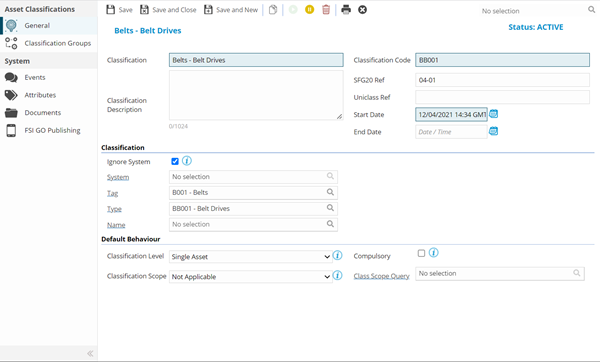
 Click to view - Asset Classification Fields and Descriptions
Complete the fields and click Save  . Once the Asset Classification header has been completed and saved a sub navigation will appear to allow additional entities to be created / assigned.
These include:
- Classification Groups
- Uniclass Hierarchy Available from 6.5.0.0
Classification Groups
Click to view more detail
Asset Classification Groups shows a grid of all Asset Classification Groups in which this Asset Classification is in use. The page can be used to control assignment of the current Asset Classification to one or more Groups if required.
Settings > Assets > Asset Classifications
The link will open the Asset Classification - Classification Groups grid. It is a grid view that can be customised and sorted as normal.
To assign Classification Groups click Assign  , Classification Groups in the right hand assignment window are connected.
To create Classification Groups see Asset Classification Groups
Uniclass Hierarchy
Click to view more detail
Available from 6.5.0.0
The Uniclass Hierarchy page shows a ‘Hierarchy Tree' view of the relationships between Element Classification records within an Element Classification Group, similar to the one currently shown in the Relationships sub-navigation of the Asset Input Panel.
In order to display the hierarchy correctly, some things must be defined in advance:
-
Element Classification Group(s) with associated Element Classifications that have Class Levels and Parent/Child relationships defined
-
An Element Classification, with at least one defined Parent, must be selected in the Element Class field against the current Asset Classification
Settings > Assets > Asset Classifications
The link will open the Uniclass Hierarchy window.
All ‘Parent’ Element Classifications linked to the Element Classification of the current Asset Classification will be represented in a tree view, including the Parent's Parent and so on.