Payment Mechanism
Available from 4.4.1.0
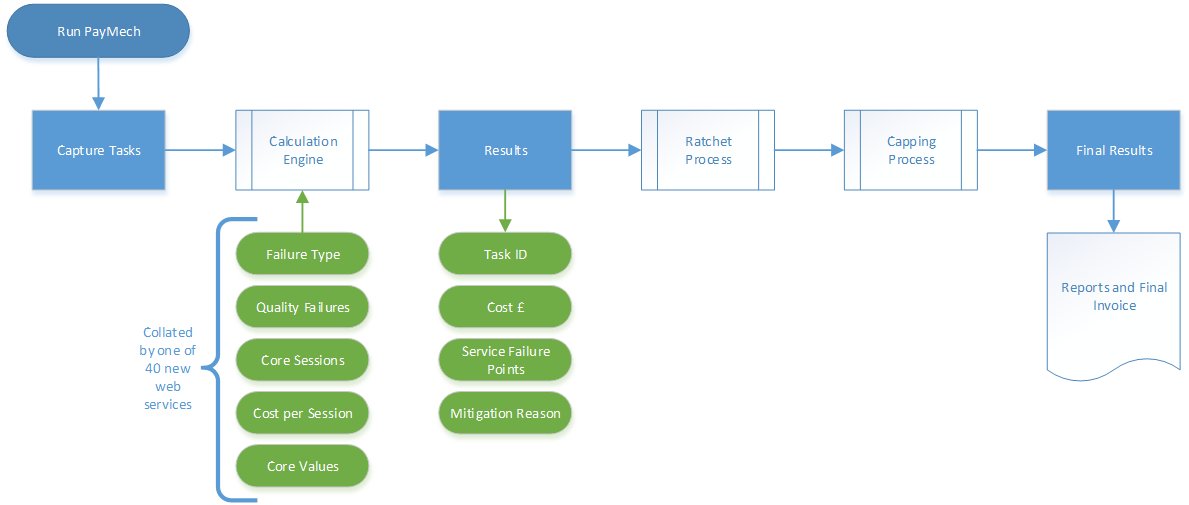
Payment Mechanisms (PayMech) define how service provider payments are calculated based on task performance, service levels, and contract terms. Configure payment calculation components including Core Values (assign monetary values to entities like Locations, Assets, Issue Types), Service Payments (define fixed monthly or annual fees), Service Level Specifications (link payment rules to Instruction Sets), PMS Task Groups and Task Queries (select which tasks feed calculations), PMS Level of Completion and PMS Priority (assign financial weights to task outcomes and priorities), Unavailability (track downtime impacts), Temporary Accommodation Types (account for service disruption costs), Volume Adjustment Types (handle quantity variations), and Ratchets (apply escalating penalties for repeated failures). When PMS Batches run, the system evaluates tasks against configured rules—for example, calculate base service payment, add task completion bonuses (based on PMS LOC values), subtract SLA failure penalties (weighted by PMS Priority), adjust for unavailability periods (calculated from Core Values), apply volume adjustments (for under/over delivery), and escalate penalties through ratchets (for consecutive failures). This supports complex contract billing (accurately reflect performance-based pricing), incentivises service quality (bonuses for meeting targets, penalties for failures), and provides audit trails (detailed calculation breakdowns for each payment period).
| Icon | Feature | Description |
|---|---|---|

|
Core Values | Core Values allow many different entities to be used to generate a part of the calculation within the Payment Mechanism module. |

|
Payment Mechanism Preferences | The PMS Preferences allow up to four User Defined fields to be made visible on the Helpdesk if required. |

|
PMS Level Of Completion | PMS Level of Completion (LoCs) are very similar to Task related LoCs. However PMS LoCs are put against a Task for purely financial reasons to feed or alter the PayMech calculation. |

|
PMS Priority |
PMS Priority allows a PayMech Priority to be attached to multiple Instruction Sets. PMS Priorities are very similar to Task related Priorities. However PMS Priorities are put against a Instruction Set for purely financial reasons to feed or alter the PayMech calculation. |

|
PMS Ratchets | Ratcheting allows for an increase in penalties if subsequent failures occur. The Ratchet can be associated with either a Task or failed Task periods and can be ran across one or more PMS Batches (consecutively or non consecutively). |

|
PMS Task Groups | PMS Task Groups are used to gather groups of Task for use in PMS Batches and Ratchets. Multiple PMS Task Groups can be created to ensure the right Payment Mechanisms are applied to the correct groups of Tasks. |

|
PMS Task Queries | PMS Task Queries are used to gather groups of Tasks for use in PMS Batch runs and Ratchets. |

|
Service Payments | Service payments allow the set-up of both annual and monthly standard payments. |

|
Service Level Specification | (SLS) Service Level Specifications that are laid out in the Payment Mechanism Contract. These would typically be Instruction Sets. |

|
Temporary Accommodation Type | If a Location has become unavailable due to a fault or ongoing maintenance work, it is sometimes possible to move the functions of this Location into Temporary Accommodation whilst the works are being completed. Temporary Accommodation Types can be used to show the different accommodation types available and be used to feed PayMech calculations. |

|
Unavailability | Creating Unavailability flags allows entities to be easily marked as Unavailable from the Helpdesk, this unavailability can be used to feed the PayMech calculation. |

|
Volume Adjustment Types | There is often agreement between supplier and client that number of items must be delivered e.g. deliver x number of meals, clinical waste disposed of x number of times daily. If the quantity delivered is different for the agreed terms a payment difference or volume adjustment may be required. |