Project Management
Multi-level project organization grouping related tasks under unified project banners. Supports hierarchical authorization structures, task grouping through Task Groups, standard task features (assignment, tracking, status management), project-level controls, risk logging, Gantt scheduling, move task coordination, and consolidated project reporting across all grouped tasks.
Modules > Projects > Projects
The link will open the Projects grid. It is a grid view which can be searched, sorted and customised as normal.
To add a new Project click New  , to edit an existing Project click Edit
  . A pop up window will appear which will allow the creation or amendment of a Project.
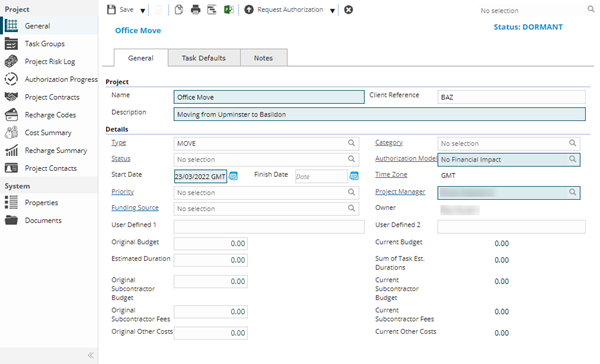
 Click to view - Projects Fields and Descriptions
Project Tasks can be set default values to speed up the process of creation. When a Project Task is subsequently raised the default values will auto-populate.
Click to view - Task Defaults Tab Fields and Descriptions
 Available from 7.0.0.0
Click to view - Notes Tab Fields and Descriptions
Complete the fields and click Save  . Once the Project header has been completed and saved a sub navigation will appear to allow additional entities to be assigned.
These include:
- Project Task Groups
- Project Risk Log
- Authorisation Progress
- Project Contacts
- Recharge Codes
- Cost Summary
- Recharge Summary
- Projects Contacts
Task Groups
Click to view more detail.
Projects are time managed using Tasks. Project Tasks are organised in Task Groups
Modules > Projects > Task Groups
The link will open the Projects / Task Groups grid. It is a grid view that can be customised and sorted as normal.
To add a new Task Group click New , to edit an existing Task Group click Edit . A pop up window will appear which will allow the creation or amendment of a Task Group.
For details on Task Groups and Project Tasks see Project Task Groups
Project Risk Log
Click to view more detail.
As a Project runs through its life cycle it may encounter risks. These risks can be recorded in the Project Risk Log.
Modules > Projects > Project Risk Log
The link will open the Projects / Project Risk Log grid. It is a grid view which can be searched, sorted and customised as normal.
To add a new Project Risk Log click New , to edit an existing Project Risk Log click Edit . A pop up window will appear which will allow the creation or amendment of a Project Risk Log.
For details on Project Risk Logs see Project Risk Log
Authorisation Progress
Click to view more detail.
The authorisation progression of a Project can be tracked and viewed from sub navigation Authorisation Progress, this is a view only screen.
Modules > Projects > Authorisation Progress
The link will open the Projects / Authorisation Progress grid. It is a grid view that can be customised and sorted as normal.
Project Contracts
Click to view more detail.
Before Tasks can be raised against the Projects, the relevant Contracts must be assigned.
Contracts must have the Contract Type of Projects or Projects And Service to be available.
Modules > Projects > Project Contracts
The link will open the Projects / Project Contracts grid. It is a grid view that can be customised and sorted as normal.
To assign Contracts click Assign  , entities in the right hand assignment window are connected.
Recharge Codes
Click to view more detail.
To allow costs to be allocated to Project Recharge Codes must be assigned.
Modules > Projects > Recharge Codes
The link will open the Projects / Recharge Codes grid. It is a grid view that can be customised and sorted as normal.
To assign Recharge Codes click Assign , entities in the right hand assignment window are connected.
Cost Summary
Click to view more detail.
The Cost Summary sub navigation allows a User to view costs that have been incurred on a Project, this is a view only screen.
Click the  button to run the PR-010 Project Cost Summary report.
Modules > Projects > Cost Summary
The link will open the Projects / Cost Summary grid. It is a grid view which can be searched, sorted and customised as normal.
Recharge Summary
Click to view more detail.
The Recharge Summary sub navigation allows a User to view the recharging of costs that have been incurred on a Project, this is a view only screen.
Click the button to run the PR-010 Project Cost Summary report.
Modules > Projects > Recharge Summary
The link will open the Projects / Recharge Summary grid. It is a grid view which can be searched, sorted and customised as normal.
Project Contacts
Click to view more detail.
Contacts can be assigned to a Project.
Modules > Projects > Project Contacts
The link will open the Projects / Project Contacts grid. It is a grid view that can be customised and sorted as normal.
To assign Contacts click Assign , entities in the right hand assignment window are connected.
Additional Icons
| Icon | Feature | Description |
|---|---|---|

|
Open report | Print the PR-001 Project Details report. |

|
Open Gantt Chart | Open the Project Gantt Chart. |

|
Export to MS Projects | Export the Project to Microsoft Projects. |

|
Project back to Dormant | Move the Project back to a dormant status. |

|
Request Authorisation | Request authorisation for the Project |

|
Approve | Approve the Project. |

|
Reject | Reject the Project. |

|
Cancel | Cancel the Project. |

|
Complete | Complete the Project. |