Project Tasks
Individual project work items including meetings, management activities, and deliverables. Project Tasks link to projects and Task Groups, support priority assignment, resource allocation, status tracking, instruction sets, and progress monitoring with resource time and financial detail reporting.
Modules > Projects > Projects > Project Tasks
The link will open the Tasks Groups / Project Task grid. It is a grid view that can be customised and sorted as normal.
To add a new Project Task click New  , to edit an existing Project Task click Edit
  . A pop up window will appear which will allow the creation or amendment of a Project Task.
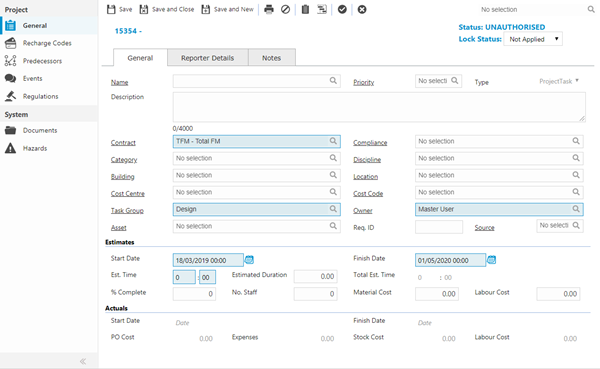
 Click to view - Project Task General Tab Fields and Descriptions
 Available from 7.0.0.0
Click to view - Project Task Reporter Details Tab Fields and Descriptions
Click to view - Project Task Notes Tab Fields and Descriptions
Complete the fields and click Save  . Once the Project Task header has been completed and saved a sub navigation will appear to allow additional entities to be assigned.
These include:
- Recharge Codes
- Predecessors
- Events
- Regulations
Recharge Codes
Click to view more detail.
Once financials have been entered on the Project Task, amounts or percentages can be marked as recharged to the Recharge Codes allocated to the Project.
Modules > Projects > Projects > Project Tasks
The link will open the Project Task / Recharge Codes grid. It is a grid view that can be customised and sorted as normal.
To add a new Recharge Code click New , to edit an existing Recharge Code click Edit . A pop up window will appear which will allow the creation or amendment of a Recharge Code.
Click to view - Recharge Code Fields and Descriptions
Predecessors
Click to view more detail.
Within a Project certain Tasks should be started before another begins. Predecessors allows a link to be made to Tasks that should be completed before the commencement of the current Task.
Modules > Projects > Projects > Project Tasks
The link will open the Project Task / Predecessors grid. It is a grid view that can be customised and sorted as normal.
To assign Predecessors click Assign  , entities in the right hand assignment window are connected.
Events
Click to view more detail.
Events can be added to a Project Task, these can be added within the Projects itself or from Task Management.
Modules > Projects > Projects > Project Tasks
The link will open the Project Task / Events grid. It is a grid view which can be searched, sorted and customised as normal.
To add a new Event click New , to edit an existing Event click Edit . A pop up window will appear which will allow the creation or amendment of an Event. See Creating / Attaching Event Types for more details.
Regulations
Click to view more detail.
Regulations can be assigned to a Project Task. If an Instruction Set has been used that has Regulations attached these will automatically be assigned, they can be manually assigned if required.
Modules > Projects > Projects > Project Tasks
The link will open the Project Task / Regulations grid. It is a grid view which can be searched, sorted and customised as normal.
To assign Regulations click Assign , entities in the right hand assignment window are connected.
Project Tasks are managed and maintained either through the Project module or through Task Management. For more information on Task Management see Helpdesk