Requests
Available from 5.5.0.0
Appointment Requests can originate from MRI Evolution as well as other integrated systems.
Appointment Request details are agreed with an end customer:
- Day and Session Preferences
- Communication Preferences
- Agree Appointment Attendance Windows
Automated communications sent to the end customer, including progress updates, can be configured to meet user's requirements.
Available from 6.4.1.0
A Requests menu option has been added to the Task Management menu group.
The menu option will open a new Requests hierarchical grid. The hierarchy will be the parent Request records with sub-grids listing the child entity of Request Line Items.
The Requests input panel has been updated as follows:
-
New toolbar buttons have been added
-
The Details tab now has an expandable/collapsible/resizable splitter
-
The Tasks grid in the Details tab now contains Request Line Items instead of Tasks
-
A side panel for SLA information has been added
-
Two new Tabs, with new fields have been added:
-
Financial
-
Information
-
-
Certain existing fields have been reorganised within the page's tabs
-
New Request Line Item input panel, accessed via toolbar button, allowing users to create linked records with the following types (depending on the preferences set):
-
Schedule Of Rates
-
Task Actions
-
Tasks
-
-
New sub navigation options are available, containing entities linked to the Request:
-
Tasks
-
Mobile Audits
-
Sales Invoices
-
Certain updates to Tasks linked to Requests will update key information on the Request:
-
SLA Values
-
The values in the Request SLA performance fields will automatically be set based on data inserted and updated against the linked child Tasks:
-
Earliest Response date of the child Tasks
-
Earliest Arrival date of the child Tasks
-
Earliest Contain date of the child Tasks
-
Latest Completion date of the child Tasks
-
Earliest User Defined date of the child Tasks
-
-
-
Request's Status
-
The Status of the Request will automatically be updated based on Status changes to the linked child Tasks:
-
On a Save to a linked Task's Time Record:
-
When the first Start date is set
-
The Request's status will automatically be updated to In Progress
-
The status will only be updated to In Progress if the Request's Status is one of the following States:
-
New
-
Active
-
-
-
-
-
On a Save to a linked child Task:
-
When last child Task is marked as Complete
-
The Request's status will be updated to Complete
-
The status will only be updated to Complete if the Request Status is one of the following States:
-
New
-
Active
-
In Progress
-
On Hold
-
-
-
The Request state will only change to Complete if ALL linked Tasks are Complete, with the exception of Cancelled Tasks. If some Tasks linked to the Request are Cancelled but the rest are Complete, the Request's status will change to Complete.
-
-
If all linked Tasks are Cancelled
-
The Request's status will be updated to Cancelled
-
The status will only be updated to Cancelled if the Request Status is one of the following States:
-
New
-
Active
-
In Progress
-
On Hold
-
-
-
-
-
 Available from 7.0.0.0
The Purchase Key licence dependency for this specific element of the system has been removed and is now included as standard in the core MRI Evolution product the feature has been turned on for all systems by default.
Note: Other restrictions, such as User licence type restrictions and / or any restrictions to underlying functionality that is dependent upon Purchase Key licences will remain in place.
Available from 7.0.0.0
Counters have been added to the following three sub navigation menu items to display the number of records within the relevant sub navigation, shown in brackets e.g. Tasks (4):
-
Tasks
-
Mobile Audits
-
Sales Invoices
Note: The brackets and number enclosed will only be displayed when the number of records is greater than zero.
Available from 7.0.0.0
The following Request Queries are available 'out of the box' to select and filter the grid to show records that match the chosen Query:
-
New Requests
-
Requests received in the last 7 Days
-
Requests requiring Appointments
-
Requests received from AtYourService
-
Requests received from external sources
-
Self-Diagnosed Requests
Task Management > Task Appointments > Time Records or hyper-link enabled fields in various places
The link will open the Task Requests page.
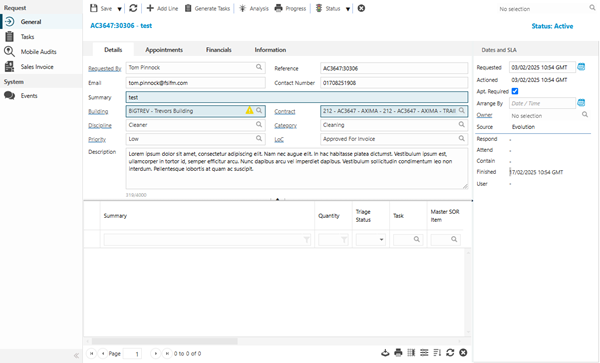
Task Request Input Panel Tabs
 Click to view more detail
Task Request- Details Tab
Click to view more detail
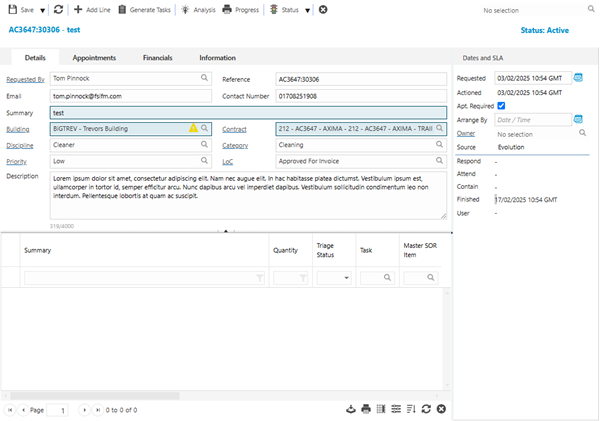
| Field Name | Description |
|---|---|
| Request Details | |
| Requested By |
The Contact making the Request. The field defaults to the Reporter of the linked Task but it can be updated. |
| Reference |
This will default to the Task Id of the linked Task. Available from 6.4.1.0 This field has been made editable. |
|
Available from 6.4.1.0 Auto-populated from the 'Requested By' Contact above, but can be edited. |
|
| Contact Number |
Available from 6.4.1.0 Auto-populated from the 'Requested By' Contact above, but can be edited. |
| Summary | Summary details of the Request. |
| Building |
Auto-complete field to select the Building of the Request. The list will be filtered to show only Buildings linked to the Contract. The Building field will be populated with the Building associated with the Contact selected in the Requested By field above, where present. It is possible to display the relevant parent/child relationship data in this auto-complete by enabling the Enable Hierarchical Auto-Completes option in the General Preferences page. |
| Contract |
Auto-complete field containing Contracts available to the Building associated with the current Request. Contracts linked to a Supplier with a Suspended Status will not be shown in the Contract auto-complete. |
| Discipline | Select the Discipline for the Request |
| Category |
Available from 6.4.1.0 Auto-complete field to select the Category of the Request. The list will be filtered to show only Categories linked to the Contract. It is possible to display the relevant parent/child relationship data in this auto-complete by enabling the Enable Hierarchical Auto-Completes option in the General Preferences page. |
| Priority |
Available from 6.4.1.0 Auto-complete field to select the Priority of the Request. The list will be filtered to show only Priorities linked to the Contract. |
| LoC |
Available from 6.4.1.0 Auto-complete field to show / select a Level Of Completion for the Request. |
| Description |
Available from 6.4.1.0 Free text field that contains an appropriate description for the Request. |
| Line Items | |
| Request Line Items grid |
Available from 6.4.1.0 Filtered list of Line Items related to the current Request. Depending on what has been set in the Request Preferences, Line Item records can be:
|
Task Request - Appointments Tab
Click to view more detail
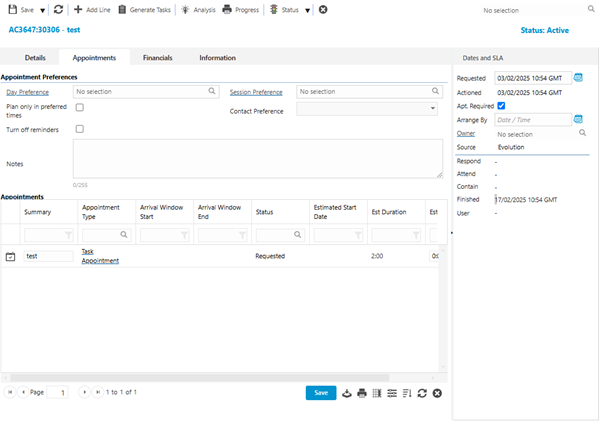
If the Apt. Required check-box = False the Appointment Tab of the Request input panel will be hidden.
| Field Name | Description |
|---|---|
| Appointment Preferences | |
| Day Preference | Auto-complete field containing Calendar Days records where Use for Appointments = True |
| Session Preference |
Auto-complete field containing Calendar Session records where Use for Appointments = True If a Value has been selected for Day Preference field, this field will be filtered to show values linked to the selected Calendar Day record |
| Plan only in preferred times | Check box to ensure the Request must occur during the defined preferred Calender Day and Calendar Session |
| Contact Preference | Multi-select drop-down containing the communication methods set for the Appointment, these can be updated here |
| Turn off reminders | Check box to disable reminders related to the Request |
| Notes | Free type field to enter details pertinent to the Appointment. |
| Appointments | |
| Appointments grid | Filtered list of Appointment Visits related to the current Request |
Task Request - Financials Tab
Click to view more detail
Available from 6.4.1.0
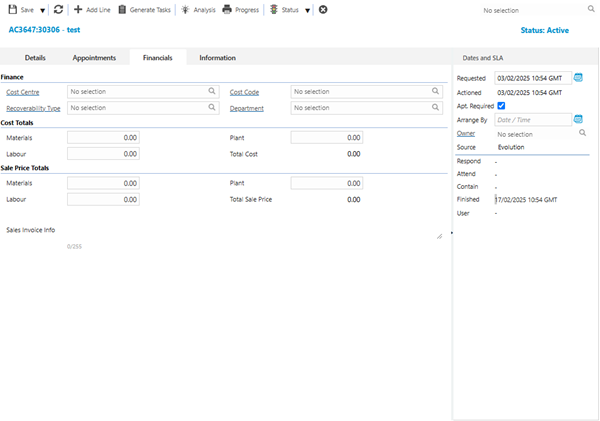
| Field Name | Description |
|---|---|
| Finance | |
| Cost Centre |
Auto complete field containing Cost Centre records where the Cost Centres are linked to the Contract and Building of the current Request. Cost Centres that have a Historic or Suspended state are excluded from this list. |
| Cost Code |
Auto complete field containing Cost Code records where the Cost Codes are linked to the selected Cost Centre. Cost Codes marked as Locked against the Cost Centre are excluded from this list. |
| Recoverability Type | Auto complete field containing Recoverability Types. Set an appropriate value for the Request. |
| Department | Auto complete field containing Department records where the Departments are linked to the Building of the current Request. |
| Cost Totals | |
| Materials | This is a calculated field based upon the sum of the Materials Costs across all Request Line Items linked to the current Request. |
| Plant | This is a calculated field based upon the sum of the Plant Costs across all Request Line Items linked to the current Request. |
| Labour | This is a calculated field based upon the sum of the Labour Costs across all Request Line Items linked to the current Request. |
| Total Cost | This is a calculated field based upon a sum of the Materials, Plant and Labour fields above. |
| Sale Price Totals | |
| Materials | This is a calculated field based upon the sum of the Materials Sale Price across all Request Line Items linked to the current Request. |
| Plant | This is a calculated field based upon the sum of the Plant Sale Price across all Request Line Items linked to the current Request. |
| Labour | This is a calculated field based upon the sum of the Labour Sale Price across all Request Line Items linked to the current Request. |
| Total Sale Price | This is a calculated field based upon a sum of the Materials, Plant and Labour fields above. |
| Sales Invoice info | Read only field displaying details of the Sales Invoice(s) linked to the current Request. |
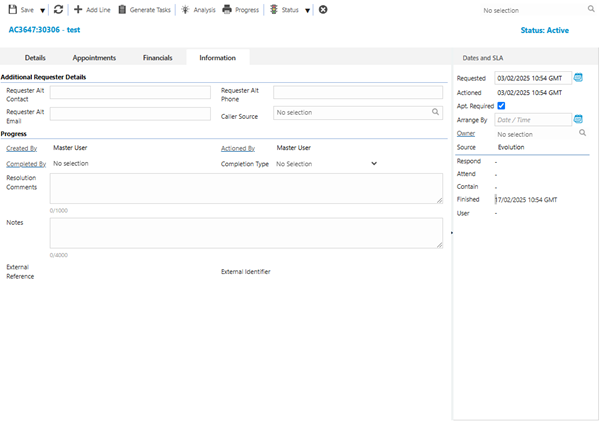
Task Request - Information Tab
Click to view more detail
Available from 6.4.1.0
| Field Name | Description |
|---|---|
| Additional Requester Details | |
| Requester Alt Contact | Free format field allowing users to add an alternative contact name/details for the Request. |
| Requester Alt Phone | Free format field allowing users to add an alternative contact phone number for the Request. |
| Requester Alt Email | Free format field allowing users to add an alternative contact email address for the Request. |
| Caller Source | Auto-complete field containing a list of Caller Sources created in the system. |
| Progress | |
| Created By | Read only field containing the name of the user that created the Request. |
| Actioned By | Read only field containing the name of the user that confirmed the Request. |
| Completed By | Read only field containing the name of the user that completed the Request. |
| Completion Type | Read only field containing the Completion Type provided by an external system, typically passed via a web service. |
| Resolution Comments | Free format field allowing users to enter relevant comments for the Request. |
| Notes | Free format field allowing users to enter relevant notes for the Request. |
| External Reference | Read only field containing an external reference for the Request, where applicable. |
| External Identifier | Read only field containing an external identifier for the Request, where applicable. |
Complete the fields and click Save .
.
On save of a new Request the system will create a new Appointment Visit linked to the current Request, if the Contract linked to the Request has Appointments enabled.
Once the Request has been completed and saved, sub navigations will appear to allow additional entities to be assigned.
These include:
Additional Icons
| Additional Icons | Feature | Description |
|---|---|---|
|
|
Save Button Group |
Standard Save buttons:
|

|
Add Line |
Add a new Line Item to this Request. |

|
Generate Tasks |
Click to automatically generate Task(s) for the selected Line Items in the Request Line Items grid. All selected Line Items must be of the same Item Type, otherwise the following validation will be displayed "In order to generate tasks for multiple items all selected Line Items must be the same Item Type. Tasks created here will be visible in the Tasks sub navigation as well as the main Tasks grid. A pop-up will be displayed, allowing users to select the appropriate Task options and apply the logic detailed below. |

|
Analysis |
Run RQ-001 - Request Line Item Allocation Analysis report to show suggested allocations for this Request. This report will look at the details of each line item in the Request and make recommendations for how the line items should be grouped and which Contracts they should be assigned to, based on a range of factors, including configuration (Building coverage, Category, Instruction Set, Schedule Of Rate capabilities), availability, performance and costs. |

|
Progress |
Run RQ-002 - Request Details and Progress report to show progress details for this Request. This report will show the progress of the issued Tasks, Task Actions and Schedule Of Rates for the Request. |

|
Status Group | The next applicable state for the current Request item is displayed but the list can be expanded to show all other permitted states. |

|
Close | Click to close the Request. |
Generate Tasks From Selected Line Items Scenarios
Click to view more detail
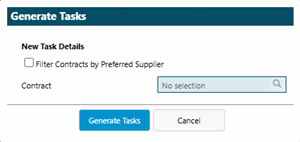
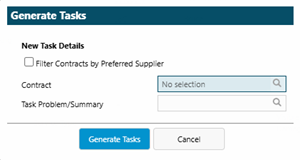
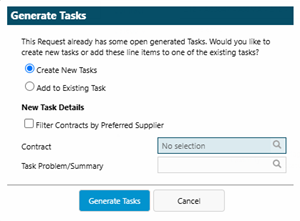
Clicking the Generate Tasks toolbar button will display a Generate Tasks pop-up, allowing users to select the appropriate Contract and Task options and apply the logic detailed below.
|
Scenario:
|
Scenario:
|
|
|
|
Behaviour: Filter Contracts by Preferred Supplier check-box:
The Contract auto-complete is mandatory and will list all Contracts that could be selected for a Task generated from the selected Line Items according to the following criteria:
Task Generation:
Appointment Visit Creation:
|
Behaviour: Filter Contracts by Preferred Supplier check-box:
The Contract auto-complete is mandatory and will list all Contracts that could be selected for a Task generated from the selected Line Items according to the following criteria:
The 'Task Problem / Summary' auto-complete is optional and allows users to select an Instruction Set to be used as the Task Problem for the generated Task
Task Generation:
Appointment Visit Creation:
|
|
Scenario:
|
Scenario:
|
|
|
|
Behaviour: Filter Contracts by Preferred Supplier check-box:
The Contract auto-complete is mandatory and will list all Contracts that could be selected for a Task generated from the selected Line Items according to the following criteria:
The 'Task Problem / Summary' auto-complete is optional and allows users to select an Instruction Set to be used as the Task Problem for the generated Task
Task Generation:
Appointment Visit Creation:
|
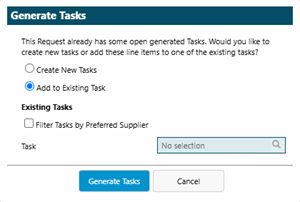
Behaviour: Filter Tasks by Preferred Supplier check-box:
The Task auto-complete is mandatory and will list all pre-existing Tasks linked with the current Request, excluding Tasks with a status of CANCELLED or REJECTED Task Generation:
|
Request Items Input Panel
Click to view more detail
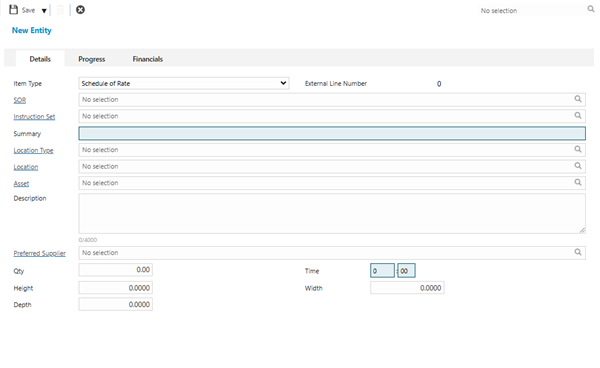
Available from 6.4.1.0
Available from 7.0.0.0
When a new Line Item is added to a Request, the parent Request will be updated as per the Recalculate table below.
When an existing Line Item is updated, the parent Request will be updated as per the Recalculate table below if any of the following criteria are met:
-
If any of the following financial values are changed for the Request Line Item:
-
Labour Cost
-
Materials Cost
-
Plant Cost
-
Labour Sale Cost
-
Materials Sale Cost
-
Plant Sale Cost
-
-
If the Triage Status of the Request Line Item is changed
-
If the Request Line Item is Soft Deleted
| Request Field | Calculation |
|---|---|
| Labour Cost | Set to the sum of Labour Cost for all linked Request Line Items where the Triage Status is NOT Discarded or Unmatched |
| Materials Cost | Set to the sum of Materials Cost for all linked Request Line Items where the Triage Status is NOT Discarded or Unmatched |
| Plant Cost | Set to the sum of Plant Cost for all linked Request Line Items where the Triage Status is NOT Discarded or Unmatched |
| Labour Sale Cost | Set to the sum of Labour Sale Cost for all linked Request Line Items where the Triage Status is NOT Discarded or Unmatched |
| Materials Sale Cost | Set to the sum of Materials Sale Cost for all linked Request Line Items where the Triage Status is NOT Discarded or Unmatched |
| Plant Sale Cost | Set to the sum of Plant Sale Cost for all linked Request Line Items where the Triage Status is NOT Discarded or Unmatched |
Request Items Input Panel - Details Tab
Click to view more detail.
| Field Name | Description |
|---|---|
| Item Type |
Select from the following:
The options available in the drop-down is dependent upon what is set in the Request Preferences. |
| External Line Number | Read only field to display the Line Number provided by an external system. |
| SOR | Select an appropriate Schedule Of Rate for the Request Line Item. |
| Instruction Set | Select an appropriate Instruction Set for the Request Line Item. |
| Summary |
When a user makes a selection in the Instruction Set auto-complete, above, this field will be auto-populated with the Description text of the selected Instruction Set. The value can be manually updated or overwritten. Summary is a mandatory field. |
| Location Type | Select an appropriate Location Type for the Request Line Item. |
| Location |
Select an appropriate Location for the Request Line Item. The list is filtered to only show Locations related to the Building of the parent Request. It is possible to display the relevant parent/child relationship data in this auto-complete by enabling the Enable Hierarchical Auto-Completes option in the General Preferences page. |
| Asset |
Select an appropriate Asset for the Request Line Item. The list is filtered to only show Assets related to the Building of the parent Request. |
| Description | Free text field to add an appropriate description for the Request Line Item. |
| Preferred Supplier |
Select an appropriate Supplier for the Request Line Item. The Supplier must be Active. |
| Qty | Enter an appropriate quantity value for the Request Line Item. |
| Time | Enter an appropriate time value for the Request Line Item. |
| Height | Enter an appropriate height value for the Request Line Item. |
| Width | Enter an appropriate width value for the Request Line Item. |
| Depth | Enter an appropriate depth value for the Request Line Item. |
Request Items Input Panel - Progress Tab
Click to view more detail.
Request Items Input Panel - Financials Tab
Click to view more detail.
| Field Name | Description |
|---|---|
| Qty | Read only field that contains the relevant quantity value for the Line Item, where present. |
| Time | Read only field that contains the relevant time value for the Line Item, where present. |
| Height | Read only field that contains the relevant time value for the Line Item, where present. |
| Width | Read only field that contains the relevant width value for the Line Item, where present. |
| Depth | Read only field that contains the relevant depth value for the Line Item, where present. |
| Cost Prices | |
| Labour | Read only field that contains the cost price for the labour required for the current Line Item, where present. |
| Stock | Read only field that contains the cost price for the stock required for the current Line Item, where present. |
| Plant | Read only field that contains the cost price for plant required for the current Line Item, where present. |
| Labour Total | Read only field that contains the total cost price for all labour required across all Line Items linked to the parent Request, where present. |
| Stock Total | Read only field that contains the total stock price for all stock required across all Line Items linked to the parent Request, where present. |
| Plant Total | Read only field that contains the total plant price for all plant required across all Line Items linked to the parent Request, where present. |
| Cost Total | Read only field that contains the sum of the Labour Total, Stock Total and Plant Total. |
| Sale Prices | |
| Labour | Read only field that contains the sale price for the labour required for the current Line Item, where present. |
| Stock | Read only field that contains the sale price for the stock required for the current Line Item, where present. |
| Plant | Read only field that contains the sale price for plant required for the current Line Item, where present. |
| Labour Total | Read only field that contains the total sale price for all labour required across all Line Items linked to the parent Request, where present. |
| Stock Total | Read only field that contains the total stock price for all stock required across all Line Items linked to the parent Request, where present. |
| Plant Total | Read only field that contains the total plant price for all plant required across all Line Items linked to the parent Request, where present. |
| Sale Total | Read only field that contains the sum of the Labour Total, Stock Total and Plant Total. |
Tasks Sub Navigation
Click to view more detail.
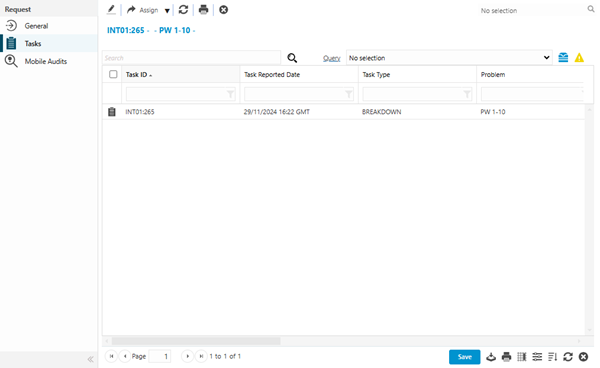
The Tasks related to the current Request can be viewed and edited from this screen.
Task Management > Requests
The link will open the Request / Tasks grid. It is a grid view that can be customised and sorted as normal.
Tasks related to the Request can be edited from the grid but new Tasks cannot be added here.
One or more Tasks can be selected in the grid and the toolbar buttons can be clicked:
-
Assign Resource
-
The Time Record window will be opened, allowing users to assign a Resource to the selected Task(s)
-
-
Open Planner
-
The Resource Planner window will be opened, allowing users to carry out the planning functionality for the selected Task(s)
-
Mobile Audits Sub Navigation
Click to view more detail.
The Mobile Audits related to the current Request can be viewed and edited from this screen.
Task Management > Requests
The link will open the Request / Mobile Audits grid. It is a grid view that can be customised and sorted as normal.
Sales Invoices Sub Navigation
Click to view more detail.
The Sales Invoices or Sales Invoice Items linked to the current Request can be viewed and edited from this screen.
Task Management > Requests
The link will open the Request / Sales Invoice grid. It is a grid view that can be customised and sorted as normal.